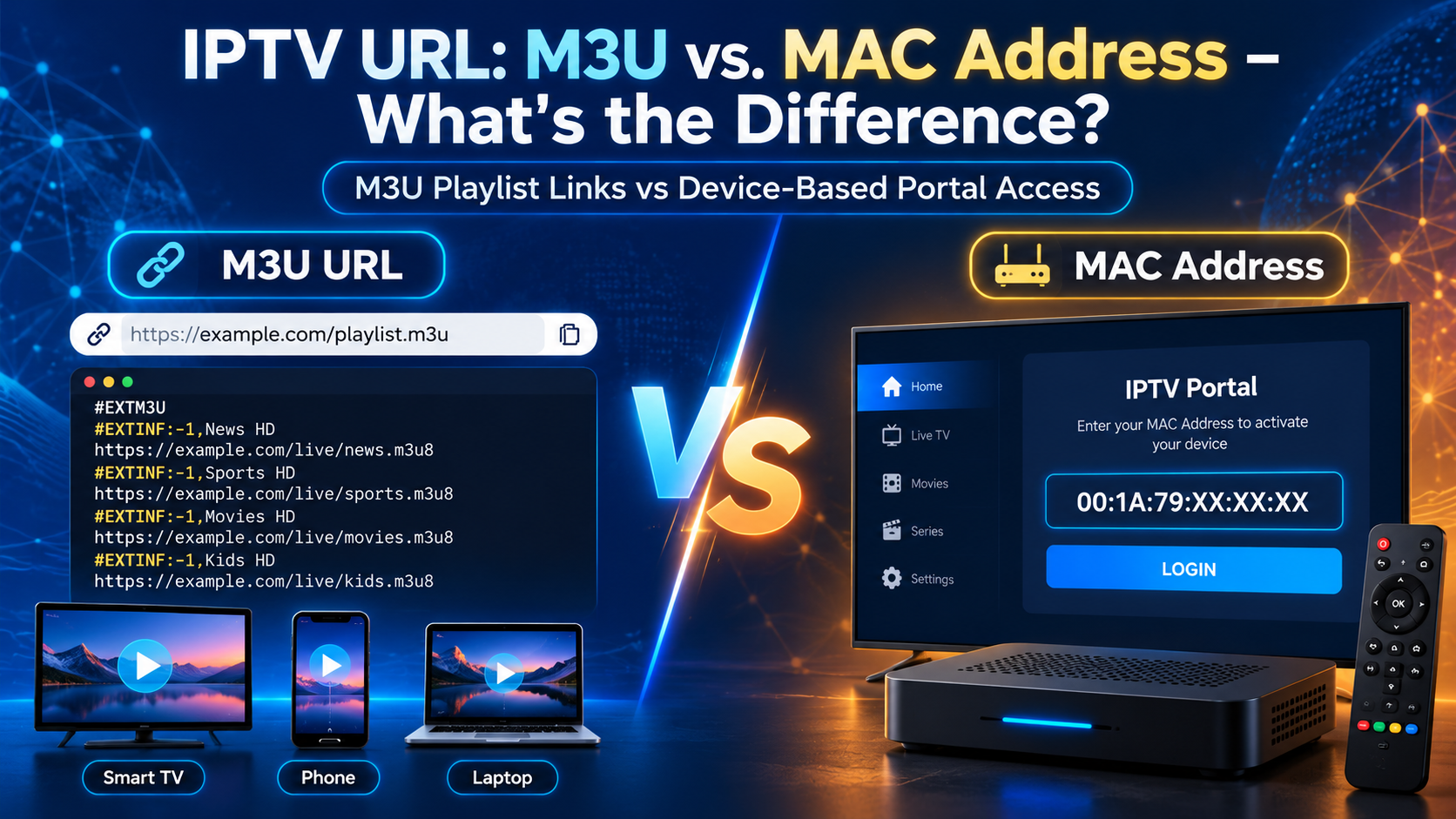
An IPTV URL connects your streaming player to live TV channels, movies, and other video content. The two common connection methods are M3U playlist URLs and MAC address-based IPTV portals.
An M3U URL gives an IPTV player a playlist containing channel information and streaming links. A MAC-based connection identifies a registered device through a provider’s IPTV portal. Both deliver television content, but they work differently.
The main difference: M3U is usually easier to use across different devices and apps. MAC-based IPTV is better suited to compatible set-top boxes and portal-based systems.
This guide explains how both methods work, their advantages, device compatibility, setup steps, and how to choose the right connection for your needs.
What Is an IPTV URL?
An IPTV URL is a web address used by an IPTV application to access a playlist, streaming server, or service portal. The address tells the application where to find the content or service information.
IPTV URLs can serve different purposes depending on the connection method. Common types include:
- M3U playlist URL: Provides access to a list of TV channels and their streaming addresses.
- Portal URL: Connects a supported IPTV device or application to a provider’s middleware.
- Direct stream URL: Points to an individual TV channel or video stream.
- EPG URL: Provides electronic program guide information, including schedules and program descriptions.
Some users call these addresses IPTV links, IPTV HTTP links, or IPTV playlist links. However, not every IPTV URL performs the same function.
For example, a playlist URL can contain information about hundreds of channels, whereas a direct stream URL usually identifies a single stream.
What Is an M3U URL in IPTV?
An M3U URL is a web link to an IPTV playlist containing live TV channels, radio stations, and video-on-demand (VOD) streams that compatible media players can access.
An IPTV M3U playlist may include channel names, logos, categories, and electronic program guide identifiers.
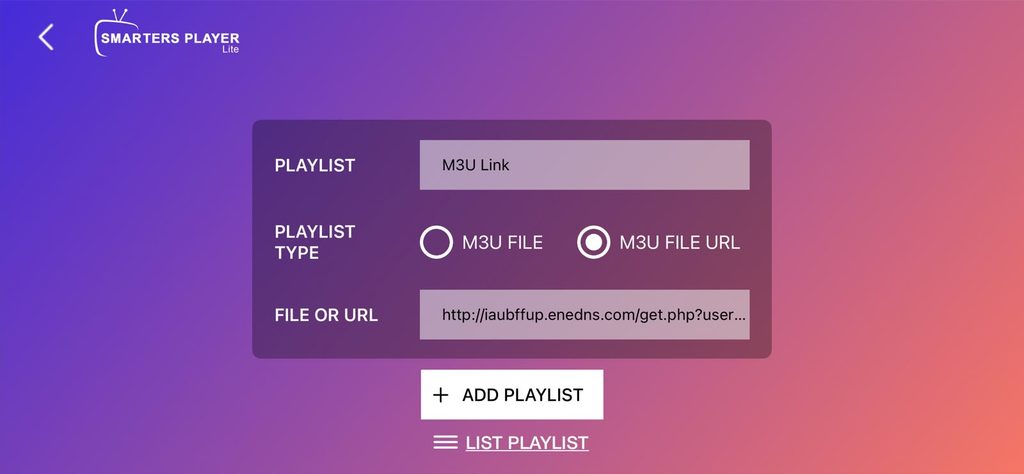
A typical IPTV playlist URL might look like this:
https://example.com/playlist.m3u
Some providers use authenticated playlist links with account information. These links should be kept private because they may grant access to a subscription.
How Does an IPTV M3U Playlist Work?
An M3U playlist works by giving the streaming application a list of media sources. The application reads the playlist and uses its entries to find and play channels. Here’s how it works —
- Plain-Text Format: An M3U playlist is a lightweight text file, usually with an
.m3uor.m3u8extension, containing streaming links.
- Playlist Structure: Uses
#EXTM3Uand#EXTINFtags to organize channel names, logos, categories, and stream URLs.
- Wide Compatibility: IPTV players such as TiviMate, IPTV Smarters Pro, and VLC can load and organize hundreds of channels from a single M3U URL.
How to Use an M3U URL
Follow these simple steps to load an M3U playlist on your IPTV player:
- Get an M3U URL: Obtain a playlist link from your IPTV provider or a legal source like IPTV-org.
- Open an IPTV Player: Launch VLC, TiviMate, or another compatible app.
- Add the Playlist: Select Add Playlist or M3U URL from the settings.
- Enter the URL: Paste your M3U link and load the available channels.
- Add an EPG (Optional): Enter an XMLTV URL to view channel schedules and program details.
Pro Tip: Enable automatic playlist updates to keep your channel list up to date without manually reloading.
7 Key Benefits of Using an M3U URL
An M3U URL makes IPTV streaming easier by providing automatic playlist updates, broad device compatibility, and simple setup without downloading local playlist files.
- Automatic Updates: Refreshes channel lists and streaming links when the IPTV provider updates the playlist.
- Easy Setup: Simply paste the M3U URL into a compatible IPTV player, such as VLC, TiviMate, or Kodi.
- No MAC Address Required: Works without MAC-based portal registration, although providers may require account authentication.
- Wide Compatibility: Supports compatible IPTV apps on Smart TVs, Firestick, Android, iOS, Windows, and macOS.
- Minimal Storage: Loads the IPTV playlist directly from a server without requiring a locally saved playlist file.
- Easy Device Switching: Use one M3U URL across compatible devices without MAC registration, subject to provider limits.
- Player Flexibility: Switch between IPTV apps without changing your playlist or subscription, if your provider allows it.
M3U is particularly useful for viewers who want to use different IPTV applications rather than remain tied to one device.
However, an M3U URL does not guarantee access to content. The streaming server must be available, and the user must have permission to watch the channels.
What Is a MAC Address IPTV?
An IPTV MAC address is a unique 12-digit hexadecimal identifier used by IPTV providers to register devices and control subscription access. It typically follows the format 00:1A:79:C2:AB:3F.
How Does an IPTV MAC Address Work?
An IPTV MAC address identifies a registered device. It allows the IPTV server to verify access without requiring a username and password in some systems.
The process generally works as follows:
- The user opens a compatible IPTV device or player.
- The application connects to the configured portal URL.
- The portal checks the registered device identity and any additional authentication information.
- The server provides authorized channels, categories, and other account information.
- The application displays the available content.
Some portal systems also require a device ID, serial number, token, or other credentials.
A MAC address alone is not a secure password. Providers may use additional authentication to protect accounts.
Hardware MAC vs. Virtual MAC
- Hardware MAC: A network identifier assigned to a device’s Wi-Fi or Ethernet interface.
- Virtual MAC: An app-generated identifier used by IPTV players such as Smart STB for registration.
How to Find Your IPTV MAC Address
- IPTV Apps: Open Smart IPTV, STBEmu, or Smart STB and check Settings → Device Information.
- Android TV: Go to Settings → Network & Internet and check the connected network details.
- Amazon Firestick: Open Settings → My Fire TV → About → Network.
- MAG Box: Check the device label or network settings for its MAC address.
Security Tip: Never share your registered IPTV MAC address or portal credentials publicly. Exposed details may allow unauthorized access, depending on the provider’s authentication system.
7 Benefits of MAC-Based IPTV
MAC-based IPTV offers simple activation, automatic content updates, and centralized device management.
- Easy Setup: Register your MAC address once, then avoid repeatedly entering login details. A portal URL may still be required.
- Automatic Updates: Loads updated channels, EPG schedules, and VOD content directly from the provider’s portal.
- Account Sharing Control: Restricts subscription access to registered devices, reducing unauthorized sharing.
- Remote Account Management: Providers can activate, renew, or update device subscriptions remotely.
- Integrated TV Guide: Displays live channels, program schedules, and VOD in one interface.
- Consistent User Experience: Keeps the same channel layout and portal interface on compatible devices.
- Centralized Content Management: Providers can update channel categories and content libraries without manual playlist imports.
The main limitation is compatibility. A Mac-based portal cannot automatically be opened in every IPTV player.
M3U URL vs MAC Address: Key Comparisons to Check
M3U URL and MAC Address are two different authentication methods for Internet Protocol Television that can be used to load IPTV streams onto a streaming player or set-top box, such as Nvidia Shield TV Pro, Apple TV 4K, Formuler Z11 Pro Max, etc.
M3U URL
An M3U URL is a web link to an IPTV playlist containing live TV channels, VOD content, and streaming links.
- How It Works: Paste the M3U URL into a compatible IPTV player to load channels.
- Compatibility: Works with VLC, Kodi, TiviMate, Firestick, Smart TVs, and other supported apps.
- Flexibility: Easily switch players, organize channels, or update playlists.
- Drawbacks: Exposed playlist credentials may be misused, and large playlists can take longer to load.
MAC Address IPTV
A MAC address is a unique device identifier used by compatible IPTV portals to register devices and manage subscription access.
- How It Works: Register your device’s MAC address with the provider and enter the supplied portal URL.
- Compatibility: Primarily supports MAG boxes, STBEmu, Smart STB, and other compatible portal-based players.
- Flexibility: Device switching may require re-registration with your IPTV provider.
- Drawbacks: Limited player compatibility, fewer playlist customization options, and greater device restrictions.
Key Difference: M3U offers wider app compatibility and easier device switching, while MAC-based IPTV provides device-specific access and centralized account management.
Key Comparison
M3U URLs offer wider device compatibility and flexibility, while MAC-based IPTV provides device-specific access and centralized management.
| Feature | M3U URL | MAC Address IPTV |
| Authentication | URL token or login credentials | Registered MAC ID, sometimes with extra credentials |
| Device Support | Smart TVs, Firestick, phones, PCs, VLC, Kodi | MAG boxes and compatible portal apps |
| Portability | Easy to switch devices, subject to provider limits | May require device re-registration |
| Security | Depends on token protection and encryption | Device registration; MAC alone is not secure |
| Customization | Supports channel sorting and external EPGs | Mostly managed through the provider’s portal |
| Setup Process | Paste an M3U URL into a player | Register MAC address and enter portal URL |
| Playlist Updates | Refreshes playlists from the server | Loads channel updates through the portal |
Which is better? Choose M3U IPTV for flexible streaming across different apps and devices. Choose MAC-based IPTV for supported set-top boxes and provider-managed access.
How to Set Up an M3U IPTV URL
To set up an M3U URL, open a compatible IPTV player, select the playlist option, paste the URL, and load the channels.
The exact menu names depend on the application.
Step 1: Choose a Compatible IPTV Player
Install a player that supports M3U playlists. Examples include VLC Media Player, Kodi with PVR IPTV Simple Client, and compatible IPTV players on supported Smart TVs.
Step 2: Get Your IPTV Playlist URL
Obtain an authorized M3U playlist URL from your streaming provider.
Make sure the address is complete and has not expired.
Step 3: Add the Playlist
Open the IPTV application and look for an option such as:
- Add Playlist
- M3U URL
- Remote Playlist
- Network Stream
Paste your IPTV playlist URL into the appropriate field.
Step 4: Load the Channels
Save the configuration and allow the application to retrieve the playlist.
Once the channels appear, select an available stream to begin watching.
If your provider supplies an EPG URL, add it through the player’s TV guide settings.
How to Set Up MAC Address IPTV
To configure MAC address IPTV, register the supported device with your provider and enter the correct portal URL in its settings.
Step 1: Check Device Compatibility
Use a supported MAG box or another player that officially supports your provider’s portal technology.
Not all IPTV applications accept MAC-based connections.
Step 2: Find the Required Device Information
Check your device’s network or portal settings for its MAC address or required identifier.
Use the identifier requested by your provider. Different portal applications may use different registration methods.
Step 3: Register the Device
Provide the required device identifier to your legitimate IPTV provider through its approved activation process.
Step 4: Enter the Portal URL
Open the device’s portal settings and enter the exact address supplied by your provider.
Save the settings and restart the application or device if required.
Step 5: Load the IPTV Service
The device should connect to the portal and display your authorized channels.
If activation fails, check the portal URL, registration status, and any additional credentials.
Can You Use IPTV M3U URLs With Kodi?
Kodi supports M3U playlists through the official PVR IPTV Simple Client, which lets users stream live TV channels and load electronic program guides (EPG).
Kodi is an open-source media center that supports different extensions for video playback, television, music, and other functions.
How to Add an M3U URL to Kodi
- Open Kodi and select Settings.
- Go to Add-ons → Install from repository.
- Open PVR clients.
- Install PVR IPTV Simple Client.
- Select Configure.
- Choose a remote playlist location.
- Enter your M3U playlist URL.
- Save the settings and enable the add-on if needed.
- Open Kodi’s TV section after the channels load.
An XMLTV EPG URL can also be configured when available.
Which Kodi Add-ons Work With IPTV?
The official PVR IPTV Simple Client is one of the most relevant Kodi add-ons for M3U playlist playback.
People searching for working Kodi add-ons, Kodi sports add-ons, Kodi video add-ons, or recommended Kodi add-ons should first consider what the add-on actually does.
For example:
- PVR IPTV Simple Client: Loads supported M3U playlists and TV guides.
- InputStream Adaptive: Supports playback of compatible adaptive streaming formats.
- Tvheadend HTSP Client: Connects Kodi to a properly configured Tvheadend backend.
The best Kodi add-on depends on your content source and setup requirements. Some add-ons play individual streams, while others connect to TV backends.
For safer Kodi downloads, use its official repository and trusted developer sources. Third-party add-ons may become unavailable, contain unsafe code, or provide unauthorized streams.
Kodi does not include paid TV subscriptions simply because an add-on is installed.
Can You Convert a MAC Address IPTV to an M3U URL?
Yes, some MAC-based IPTV portals can be converted into M3U playlists, but only if the provider supports or authorizes stream extraction. A MAC address alone cannot generate an M3U URL.
How Does MAC-to-M3U Conversion Work?
- Portal Authentication: A compatible tool connects to the Stalker/MAG portal using authorized device credentials.
- Playlist Generation: Supported tools retrieve available channel links and organize them into an M3U playlist.
- Conversion Tools: Some third-party scripts and players support exporting authorized portal streams to M3U format.
Limitations of MAC to M3U Conversion
- Provider Restrictions: Some portals block playlist exports or restrict access to registered devices.
- Additional Credentials: Certain systems require a device ID, serial number, or authentication token.
- Expiring Stream Links: Generated URLs may stop working when authentication tokens expire.
- Compatibility Issues: Some streams require portal-specific features that standard M3U players cannot handle.
Best Option: Ask your IPTV provider for an official M3U URL. It is more reliable than converting MAC-based portal access and avoids potential authentication issues.
8 IPTV URL Problems and How to Fix Them
IPTV URL errors usually occur due to incorrect links, expired subscriptions, network restrictions, or server issues. Here are the most common problems and solutions:
- Invalid M3U URL: Check the playlist format and confirm the link works in a compatible player.
- Copy-Paste Errors: Remove extra spaces, line breaks, or incorrect characters from your IPTV URL.
- HTTP/HTTPS Errors: Use the exact
http://orhttps://address provided by your IPTV service. - Invalid Credentials: Check your username, password, and special characters. Request updated login details if needed.
- Network Restrictions: Test another network and check DNS, firewall, or router settings. Avoid disabling security protections.
- Expired Subscription: Verify your account status, renewal date, and simultaneous connection limits.
- Server Downtime: Check whether the IPTV provider’s server is online. Contact support if channels remain unavailable.
- Unsupported Playlist Format: Make sure your IPTV player supports M3U, M3U8, or the streaming format supplied by your provider.
Important Tip: If your IPTV playlist fails in multiple compatible players, verify the URL and account status with your provider before changing network settings.
Is It Legal to Use IPTV URLs and MAC Addresses?
Both M3U URLs and MAC-based IPTV connections are legal technologies. Their legality depends on whether the content provider has permission to distribute the streams.
An IPTV playlist may contain licensed channels, public broadcasts, or content the user is authorized to stream.
However, an IPTV URL can also point to unauthorized copyrighted content.
To reduce risks:
- Use licensed streaming providers.
- Avoid suspicious offers promising unauthorized premium channels.
- Do not publish subscription URLs containing private credentials.
- Install IPTV applications from trusted sources.
- Check the service’s content rights and availability in your region.
Final Verdict: Which IPTV Connection Should You Choose?
Choose M3U if you want greater flexibility across compatible IPTV players. Choose MAC-based IPTV if you use a supported set-top box or provider-managed portal.
For most users who prefer switching between phones, computers, Smart TVs, and streaming applications, M3U provides a straightforward setup.
MAC-based access can be convenient for dedicated IPTV hardware, but it usually offers less flexibility when changing devices.
The most important factor is not the connection method. It is choosing a reliable, properly licensed service that supports your device and provides stable streaming.
FAQs on IPTV MAC vs. M3U
What is an IPTV URL?
An IPTV URL is a web address that connects a compatible streaming application to a playlist, video stream, or IPTV service portal.
What is the difference between an M3U URL and a MAC address?
An M3U URL identifies a playlist containing streaming links. A MAC address identifies a network interface and may be used by an IPTV portal to recognize a registered device.
Is M3U better than a MAC address for IPTV?
M3U is generally better for flexible playback across compatible applications. MAC-based IPTV is useful for supported set-top boxes and managed portal systems.
Can I use an M3U URL on a Smart TV?
Yes. Many Smart TVs support IPTV applications that accept M3U playlist URLs. Compatibility depends on the television platform and installed application.
Can I use a MAC address instead of an IPTV playlist URL?
Only if your IPTV provider and application support MAC-based portal connections. A MAC address cannot replace an M3U URL in a playlist-only player.
What is an IPTV HTTP link?
An IPTV HTTP link is a web address using HTTP to retrieve a playlist or stream. HTTPS links use encrypted connections and are preferable when supported.
What is the difference between M3U and M3U8?
M3U is a playlist format, while M3U8 indicates UTF-8 encoding. An .m3u8 file may also be an HLS streaming manifest rather than a multi-channel IPTV playlist.
Which Kodi add-on is best for an IPTV M3U playlist?
PVR IPTV Simple Client is a suitable official Kodi add-on for loading M3U live TV playlists and compatible EPG data.
Can I use one IPTV URL on multiple devices?
It depends on your provider’s account rules, simultaneous connection limits, and device registration requirements.
Why does my IPTV URL stop working?
Common causes include expired subscriptions, changed playlist addresses, revoked credentials, unavailable servers, or unsupported stream formats.
Your article helped me a lot, is there any more related content? Thanks!
Your point of view caught my eye and was very interesting. Thanks. I have a question for you.
I don’t think the title of your article matches the content lol. Just kidding, mainly because I had some doubts after reading the article.
Can you be more specific about the content of your article? After reading it, I still have some doubts. Hope you can help me.
Your article helped me a lot, is there any more related content? Thanks!
I don’t think the title of your article matches the content lol. Just kidding, mainly because I had some doubts after reading the article.
Thank you for your sharing. I am worried that I lack creative ideas. It is your article that makes me full of hope. Thank you. But, I have a question, can you help me?
I don’t think the title of your article matches the content lol. Just kidding, mainly because I had some doubts after reading the article.
Your article helped me a lot, is there any more related content? Thanks!
Your article helped me a lot, is there any more related content? Thanks!
Thanks for sharing. I read many of your blog posts, cool, your blog is very good.
Thank you for your sharing. I am worried that I lack creative ideas. It is your article that makes me full of hope. Thank you. But, I have a question, can you help me?
Your article helped me a lot, is there any more related content? Thanks!