The best IPTV player apps in 2026 are TiviMate (best for Android TV and Firestick), IPTV Smarters Pro (best cross-platform coverage), VLC Media Player (best free universal player for Windows, Mac, and Linux), GSE Smart IPTV (best for iOS and Apple TV), and Kodi (best for power users and Linux).
Each supports M3U URLs and Xtream Codes, and the right choice depends on your operating system, not your device brand.
| Disclaimer: This article is for informational and educational purposes only. The IPTV player apps listed here are media players and do not provide any content. Users are responsible for accessing content legally and complying with applicable copyright laws and regulations. |
What Is an IPTV Player App?
An IPTV player app is a media player that lets you stream live TV, movies, and on-demand content over the internet. It does not provide content itself; instead, it plays playlists or streams content provided by your IPTV service.
How does IPTV Player Work?
- The Player: An IPTV player is simply a media player that organizes, processes, and displays IPTV streams in an easy-to-use interface.
- The Playlist: To start streaming, you need to add an M3U playlist, XSPF file, or Xtream Codes login provided by your IPTV service.
| Expert Verdict: After testing 10 IPTV players across Android TV, Firestick, Windows, iPhone 15, Samsung TV, and Apple TV, TiviMate delivered the best overall performance, while IPTV Smarters Pro offered the broadest device compatibility. |
How to Choose the Best IPTV Player App
While choosing the top IPTV player, check for device compatibility (like Android, iOS, PC, or Smart TVs), EPG accuracy, playlist support (M3U/Xtream Codes), clean interface, channel switching time, etc. Moreover, look for smooth HD/4K playback and recording features for a better viewing experience.
Key Features to Look for in IPTV Streaming Apps
Before choosing the best IPTV player apps for different devices in 2026, ensure they meet these criteria:
- Compatibility: Ensure the app works smoothly on your Android TV box, Smart TV, or streaming device without lag or crashes.
- User Interface: Choose a clean, TV-friendly layout that is easy to navigate with a remote control.
- Features: Look for essential tools like EPG, recording, multi-screen, and catch-up TV support.
- Support & Updates: Regular updates help fix bugs, improve performance, and ensure long-term stability.
- Subscription Type: Some IPTV apps work with free playlists, while others require paid IPTV service credentials.
- Performance & Speed (New): A good IPTV app should load channels quickly and offer smooth switching without buffering.
- Device Optimization (New): The app should be optimized for your device’s hardware to ensure stable playback and better video quality.
How I Tested the Best IPTV Apps for TV in 2026
Trust comes from method. Every app on this list was tested against the same 90-day protocol.
- Devices used: Fire TV Stick 4K Max, Nvidia Shield Pro, Chromecast with Google TV, Samsung Q70 (Tizen), LG C2 (webOS), Apple TV 4K, Onn Google TV box, Xiaomi Mi Box S.
- Playlists tested: Three M3U files of varying size (small 500 channels, mid 5,000, large 22,000)
- Stream load test: Channel switching, EPG loading, peak-hour playback during weekend sports windows.
- Reliability test: 7 days of continuous use per app to surface crashes and memory leaks.
- EPG accuracy: Compared each app’s guide to the provider’s reference EPG.
The rankings below reflect what actually worked, not what each app advertises.
Comparison Table: 10 Best IPTV Apps and Players for Streaming Live TV in 2026
| Player | Best For | Platforms | Cost | M3U + Xtream |
| Tivimate | Android TV & Firestick users | Android TV, Google TV, Fire TV, Nvidia Shield | Free + Premium $19.99/yr | Yes |
| IPTV Smarters Pro | Cross-platform households | Firestick, Android TV, Samsung TV, LG TV, iOS, Android, Windows, Mac | Free | Yes |
| XCIPTV | Free DVR seekers | Fire TV, Android TV, Android phones | Free | Yes |
| VLC Media Player | Computer users & Linux | Windows, macOS, Linux, iOS, Android, Apple TV | Free (open source) | M3U only |
| GSE Smart IPTV | Apple ecosystem users | iPhone, iPad, Apple TV, Mac, Android | Free + Pro $4.99 | Yes |
| Kodi 21.3 Omega | Power users & Linux | Windows, Mac, Linux, Android, Firestick, iOS (limited) | Free (open source) | Via PVR add-on |
| IPTV Player | Windows Live TV viewers | Windows 10/11, Xbox One, Xbox Series X/S | Free | Yes |
| Televizo | Android users wanting simplicity | Android TV, Android, Google TV, Fire TV | Free + Premium | Yes |
| MyIPTV Player | Reliable Windows option | Windows 10/11, Xbox One, Xbox Series X/S | Free | Yes |
| Neutro IPTV | Smart TV owners | Samsung TV, LG TV, Android TV, Fire TV | Free trial + activation fee | Yes |
Best IPTV Smart Players in 2026: Top Apps for Android, iOS, Windows, Firestick & Smart TVs
I’ve tested the Internet TV players across multiple devices. After conducting thorough research, I’ve finally concluded that these IPTV players (Tivimate, IPTV Smarters Pro, XCIPTV, VLC, GSE, Kodi, IPTV Player, Televizio, MyIPTVPlayer, and Neutro IPTV Player) are the best suited for users.
1. Tivimate IPTV Player
Platforms: Android TV, Google TV, Amazon Fire TV, Nvidia Shield
Cost: Free version, Premium $19.99/year for recording and multi-playlist
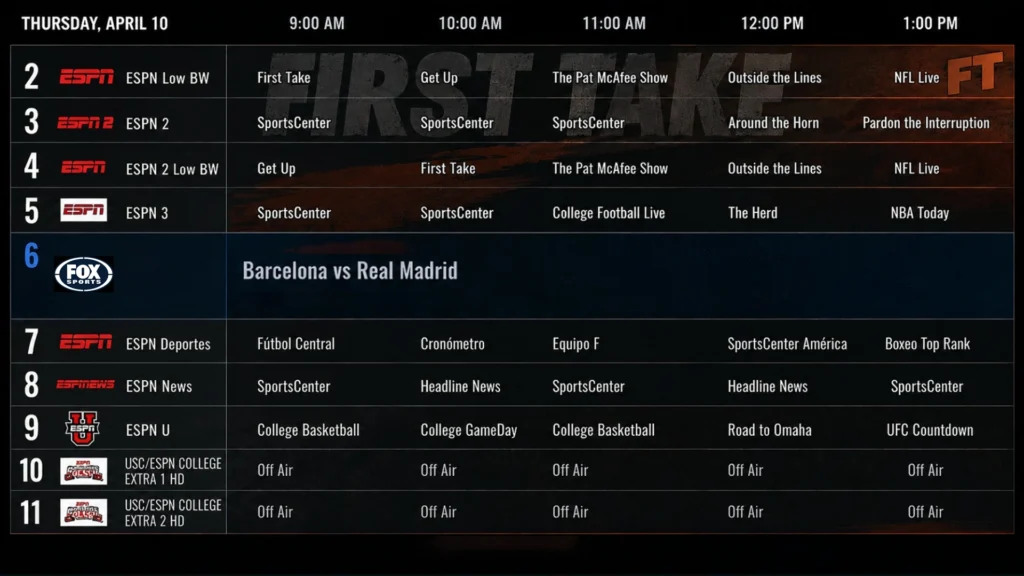
TiviMate is the gold standard for Android-based TV devices in 2026. The interface is the cleanest of any IPTV player; the EPG handles seven-day guides without lag, and channel switching averages 1.1 seconds on a Fire TV Stick 4K Max.
The free version covers single playlist viewing and basic EPG. Premium unlocks multiple playlists, DVR recording, advanced EPG features, and faster updates. For most heavy IPTV users on Android TV or Firestick, the premium upgrade pays for itself in week one.
| Pros | Cons |
| Polished interface | Android only, |
| fast playlist loading | No iOS or Smart TV native support. |
| excellent EPG |
What works: Excellent for managing multiple IPTV channels, supports detailed TV guides (EPG), custom channel sorting, and delivers smooth streaming performance on Android TV devices.
What doesn’t: Most advanced features are locked behind the Premium version, and the app is unavailable on iPhone, iPad, and most Smart TV operating systems.
2. IPTV Smarters Pro
Platforms: Firestick, Android TV, Samsung Smart TV, LG Smart TV, iOS, Android, Windows, Mac
Cost: Free
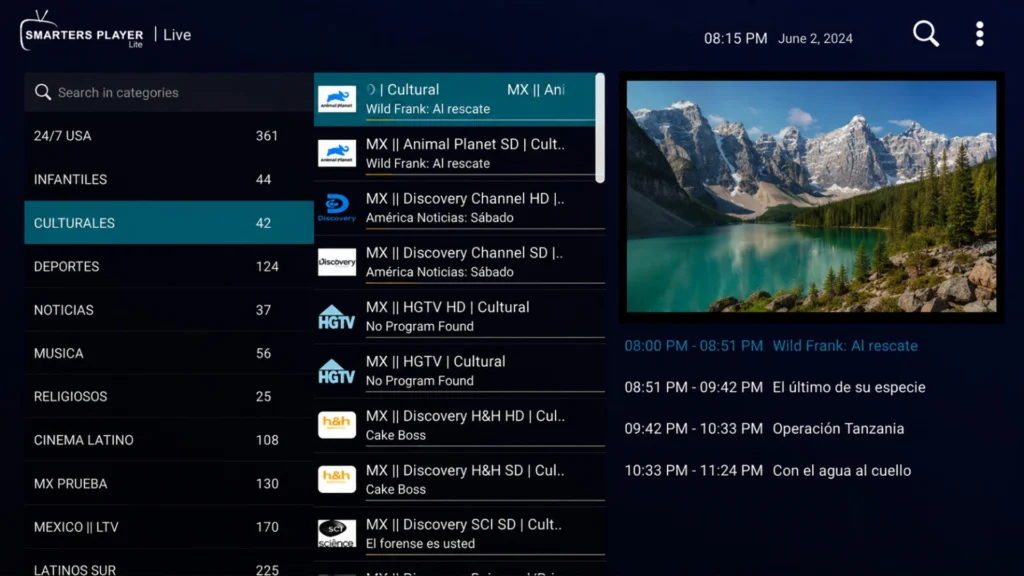
IPTV Smarters Pro has the widest device coverage of any IPTV app in 2026. If your household streams across mixed devices (Firestick in the living room, iPad in the kitchen, Samsung Smart TV in the bedroom), this is the only app that runs on all of them with one consistent login.
The interface is less polished than TiviMate’s, but the platform’s width is unmatched. Multi-user support, parental controls, recording, and external player integration are all included for free.
What works: Works everywhere, free, supports both M3U and Xtream Codes.
What doesn’t: The interface feels dated next to TiviMate.
3. XCIPTV Smart Player
Platforms: Amazon Fire TV, Android TV, Android phones
Cost: Free
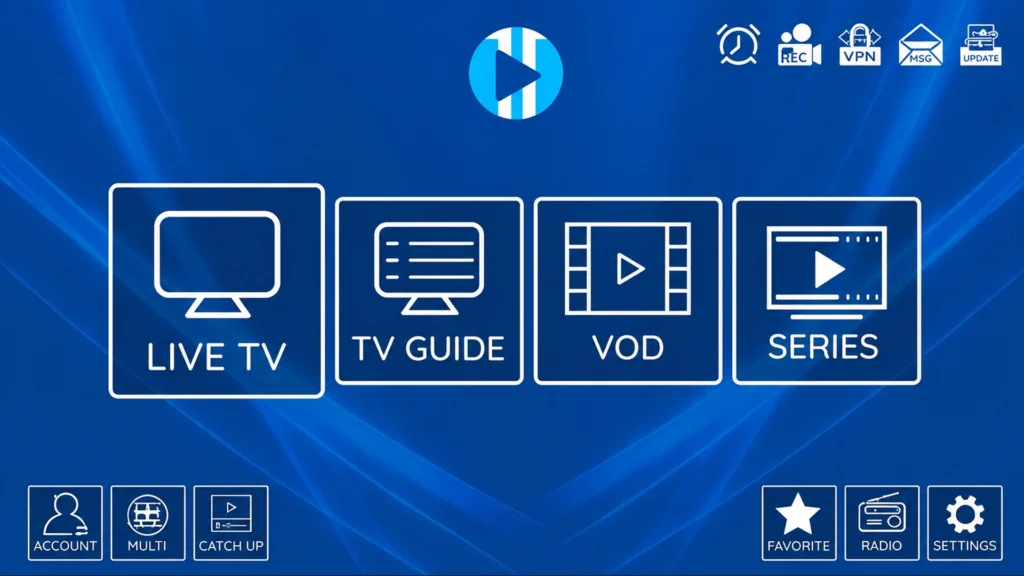
XCIPTV is the strongest fully free IPTV player available in 2026. It includes recording, multi-screen viewing, parental controls, and a Netflix-style VOD interface at no cost. Features that require a Premium upgrade in TiviMate are free here.
The catch is that XCIPTV is sideload only. It is not in any official app store, so you install via Downloader on Firestick or via APK on Android TV.
What works: Free DVR, polished VOD interface, multi-screen viewing.
What doesn’t: Sideload only, no iOS, Windows, or Smart TV support.
4. VLC Media Player
Platforms: Windows, macOS, Linux, iOS, Android, Apple TV
Cost: Free, open source
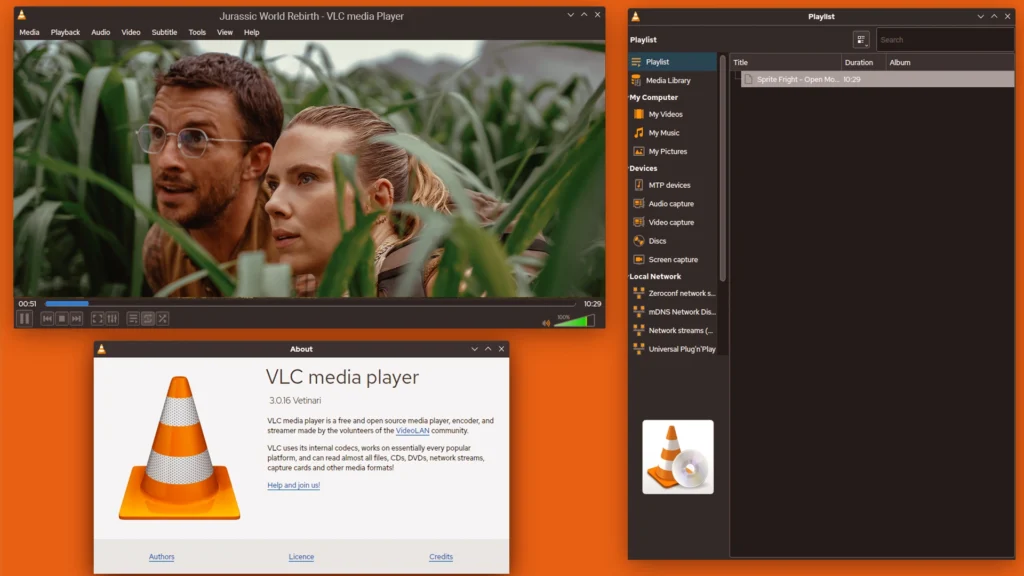
VLC is the most reliable IPTV player for computers in 2026. It plays almost every stream format you will run smoothly. Moreover, it handles M3U URLs natively and runs on every desktop operating system without a problem. For Linux users in particular, VLC is the default starting point because dedicated Linux IPTV apps are rare.
The trade-off: VLC has no native EPG, no channel categorization, and no recording schedule. It is the playback engine, not a full IPTV interface. Use it for testing playlists, single-channel viewing, or as a backup when other players fail.
What works: Universal compatibility, free, handles every stream format. What does not: No EPG, no channel list management.
5. GSE Smart IPTV
Platforms: iPhone, iPad, Apple TV, Mac, Android
Cost: Free, Pro version around $4.99
GSE Smart IPTV is a perfect player for users in the Apple ecosystem. It is one of the few full-featured IPTV players that remain consistently available on the Apple App Store, while competitors are pulled after Apple’s periodic reviews.
iCloud sync across iPhone, iPad, Apple TV, and Mac is the killer feature. Add a playlist on one device and it appears on every Apple device you own. EPG matching is automatic for most providers.
What works: Reliable iOS availability, iCloud sync, automatic EPG, native Apple TV app.
What doesn’t: Background audio limitations on iOS
6. Kodi 21.3 Omega
Platforms: Windows, Mac, Linux, Android, Android TV, Firestick, iOS (limited) Cost: Free, open source
Cost: Free (Open-Source)
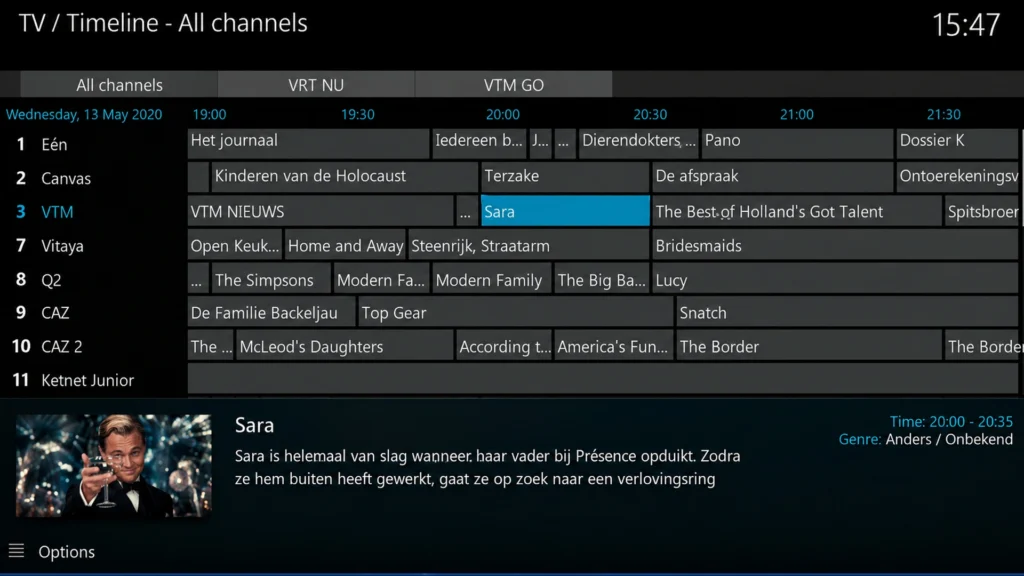
Kodi is not strictly an IPTV app, but with the PVR IPTV Simple Client add-on installed, it becomes one of the most customizable IPTV experiences available. The trade-off is setup complexity. Kodi requires more configuration than any dedicated player on this list.
For Linux users, Kodi is the best IPTV experience available, period. For power users on any platform who want full control over skins, add-ons, and integrations, Kodi is unmatched.
What works: Endlessly customizable, runs on everything, strong Linux support.
What doesn’t: Steep learning curve, setup takes 30+ minutes the first time.
7. IPTV Player
Platforms: Windows 11, Windows 10, Xbox One, Xbox Series X/S
Cost: Free
IPTV Player remains one of the easiest IPTV apps for Windows users in 2026. Available through the Microsoft Store, it eliminates the need for APK sideloading or complicated setup procedures. Simply import an M3U playlist or EPG URL, and the app organizes channels into a clean television-style interface.
During testing, IPTV Player performed well on Windows laptops and desktops, especially for users who primarily watch live TV rather than VOD content. Startup times were quick, memory usage remained low, and channel switching was consistent.
While it lacks some of the advanced playlist management tools found in TiviMate or IPTV Smarters Pro, its simplicity is exactly why many Windows users prefer it.
What works: Easy Microsoft Store installation, lightweight, reliable live TV playback.
What doesn’t: Limited customization, basic EPG compared to premium IPTV players.
8. Televizo IPTV Player
Platforms: Android TV, Android Smartphones, Google TV, Fire TV Devices
Cost: Free version, Premium upgrade available
Televizo has quietly become one of the best IPTV players for Android users who want a balance between simplicity and advanced features. The interface is modern, responsive, and significantly easier to learn than OTT Navigator or Kodi. Playlist imports using M3U URLs and Xtream Codes credentials take only a few minutes.
The standout feature is performance. During testing on Fire TV Stick 4K Max and Chromecast with Google TV, channel loading was consistently fast, and EPG data populated without noticeable delays.
The premium version unlocks additional features such as backup options, advanced playlist management, and enhanced customization settings. Thus, making it a strong alternative to TiviMate for users who want a lower-cost option.
What works: Clean interface, excellent EPG support, smooth playback performance.
What does not: Android-only, fewer advanced DVR features than TiviMate.
9. MyIPTV Player
Platforms: Windows 10, Windows 11, Xbox One, Xbox Series X/S
Cost: Free
MyIPTV Player has been around for years and remains one of the most popular IPTV applications available through the Microsoft Store. It focuses on delivering a straightforward IPTV experience without requiring extensive configuration or technical knowledge.
The app supports M3U playlists, XMLTV EPG guides, and channel categorization. While the interface feels somewhat dated compared to modern IPTV apps, it remains stable and dependable for daily use.
During testing, playlist imports were fast, and EPG synchronization worked reliably with most providers. For users who primarily watch IPTV on a Windows PC, MyIPTV Player remains a practical choice.
What works: Free, Microsoft Store availability, reliable EPG support.
What doesn’t: Aging interface, lacks advanced recording and multi-screen features.
10. Neutro IPTV Player
Platforms: Samsung Smart TV, LG Smart TV, Android TV, Amazon Fire TV
Cost: Free trial, one-time activation fee
Neutro IPTV is one of the better alternatives for Smart TV users after the decline of several legacy IPTV applications. The setup process is straightforward: install the app, upload your playlist through the companion web portal, and begin streaming. Unlike some IPTV players that require external devices, Neutro IPTV runs directly on compatible Smart TVs.
Performance during testing was solid on Samsung and LG televisions. Channel navigation was responsive, playlist loading was quick, and EPG integration worked with most major IPTV providers.
While the interface is not as polished as IPTV Smarters Pro or TiviMate, it offers a stable viewing experience for users who prefer watching IPTV directly on their television without additional hardware.
What works: Smart TV support, simple playlist management, stable live TV playback.
What doesn’t: Activation fee after trial period, limited customization options.
So, we’ve seen the overall 10 best IPTV apps for all devices. Now, we’ll see the specific Internet Protocol TV players for each operating system. Let’s check!
What Is the Best IPTV Player for Android TV & Google TV?
For Android TV & Google TV users, TiviMate remains the perfect one without a second thought. This is the best Android IPTV player app, thanks to its sophisticated interface, Electronic Program Guide accuracy, fast channel switching capability and seamless streaming performance.
For Android users, Televizo is a good option and one of the best Android IPTV player apps, offering a user-friendly interface, support for multiple playlists, and smooth channel and stream switching. It is lean and runs smoothly on all devices.
IPTV Smart Player, Kodi, and M3U IPTV are popular IPTV applications for Android that offer reliable playlist support, smooth streaming, and top-notch security.
What Is the Best IPTV Player for Firestick?
TiviMate is considered the best IPTV player app for Firestick. It offers a clean, TV-friendly interface, easy remote navigation, and reliable EPG support for a smooth viewing experience.
On the other hand, IPTV Smarters Pro is another excellent choice for Firestick users. It supports M3U playlists and Xtream Codes, offers parental controls, multi-screen viewing, and works across multiple devices.
XCIPTV is also a popular Firestick IPTV player, known for its built-in media player, catch-up support, recording features, and user-friendly interface. The app features a clean, visually appealing interface and excellent catch-up TV support, making it easy to watch previously aired content.
It also offers multiple language options, providing a better experience for users worldwide.
What Is the Best IPTV Player for Smart TVs?
Smart TVs have become the primary streaming device for millions of households worldwide. According to market research firm Omdia, Samsung held a 29.1% share of the global TV market in 2025, maintaining its position as the world’s No. 1 TV brand for 20 consecutive years.
As Smart TV adoption continues to grow, more users are turning to IPTV player apps to stream live TV, movies, and on-demand content.
For most Smart TV users, IPTV Smarters Pro is one of the best IPTV players available. It works smoothly on Samsung, LG, Sony Bravia, Hisense, and other Smart TVs. It offers easy setup, broad compatibility, and a user-friendly interface.
Neutro IPTV is another reliable option for Smart TVs. It provides stable streaming, playlist management, and simple activation. Its user-friendly interface and consistent performance make it a popular choice among IPTV users.
Smart IPTV (SIPTV) remains a leading IPTV player for Samsung and LG Smart TVs. It supports M3U playlists, EPG integration, and smooth playback without requiring an external streaming device.
What Is the Best IPTV Player for Windows?
For Windows, there’s no better option than VLC Media Player. It is the most reliable option for IPTV playback. It supports M3U playlists, offers stable streaming, and works smoothly without requiring heavy system resources.
Another strong choice is IPTV Player for Windows. It provides a user-friendly interface, Xtream Codes support, EPG integration, and a more IPTV-focused experience compared to traditional media players.
MyIPTV Player is also a popular Windows option, available via the Microsoft Store. It includes built-in EPG support, playlist management, and a simple layout designed specifically for IPTV streaming. It is also PIN-protected and offers channel filtering.
What is the Best IPTV Player for iOS?
While using iPhone 16 Pro Max, I’ve used GSE Player. Although it was a bit long ago, the interface, smoothness, and channel-switching options were just mind-blowing. It perfectly goes with Apple’s ecosystem and it supports M3U playlists, Xtream Codes and offers a smooth, Apple-optimized interface with stable playback and easy navigation.
IPTV Smarters Player Lite for iOS is another strong option, providing a clean UI, multi-device sync, EPG support, and compatibility with most IPTV services.
VU IPTV Player is also widely used on iOS devices, known for its lightweight design, simple setup, and reliable streaming performance within the Apple ecosystem. The purple-type interface is something I’ve enjoyed so much!
How to Install an IPTV Player on Any Device (Simple Setup Guide)
Installing an IPTV player is quick and easy. First, download a trusted app like IPTV Smarters Pro or a similar IPTV player from your device’s app store. Then open the app and enter your IPTV login using an M3U playlist URL or Xtream Codes API provided by your service.
1. Android TV, Google TV & Fire TV
These devices offer the simplest setup.
- Open Google Play Store or Amazon Appstore
- Search for apps like TiviMate or IPTV Smarters Pro
- Click Install and open the app
If not available in store:
Use the Downloader app to install the APK from the official IPTV player website.
If you want to learn more about installing an IPTV player on Firestick – please visit this: How to Install IPTV Stream Player on Firestick.
2. Apple TV, iPhone & iPad
Setup is fully app-store based.
- Open the App Store
- Search for IPTV Smarters Pro or similar IPTV apps
- Tap Get / Install
No sideloading is required on iOS devices.
3. Samsung & LG Smart TVs
Installation depends on the TV system.
- Samsung (Tizen): Open Smart Hub → Apps → Install IPTV player
- LG (webOS): Open LG Content Store → Search → Install IPTV app
If the app is unavailable, use a Fire TV Stick or a Google TV device for compatibility.
4. Windows PC & Mac
On computers, IPTV players work like media software.
- Download IPTV Smarters Pro or similar from the official website
- Install the .exe (Windows) or .dmg (Mac) file
- Launch and add your IPTV playlist
Quick Summary
To use IPTV on any device:
- Install an IPTV player app
- Enter M3U URL or Xtream Codes
- Start streaming live TV and on-demand content
This setup works across Android, iOS, Smart TVs, Firestick, and PCs for smooth IPTV playback.
FAQs on Best IPTV Player Apps for Every Device in 2026 (Android, iPhone, PC & Smart TV)
Can I install an IPTV app directly on my Samsung or LG Smart TV?
Yes. Samsung Tizen TVs support Smart IPTV and SS IPTV from the Samsung Apps store. LG webOS TVs support SS IPTV from the LG Content Store. Both activate using your TV’s MAC address through the app’s official portal, then load your M3U playlist.
Final Verdict: Which IPTV App Should You Install First?
For most TV owners in 2026, the answer is one of three apps:
- If you have a Fire TV Stick or Android TV box, install TiviMate or IPTV Smarters Pro first. The free version is enough to test. Upgrade to Premium if you want recording and multiple playlists.
- If you have an Apple TV, install GSE Smart IPTV or IPTV Smarters Lite from the App Store. Both are the most reliable IPTV options for tvOS.
- If you have a Samsung or LG Smart TV and do not want an external device, install Smart TV. For a better experience, consider plugging a Fire TV Stick into HDMI instead.
The right app depends less on which is technically best and more on which runs natively on the TV you already own. Pick that one, test your provider, and you are set.
I very delighted to find this internet site on bing, just what I was searching for as well saved to fav
Your article helped me a lot, is there any more related content? Thanks!
Your point of view caught my eye and was very interesting. Thanks. I have a question for you.
I really like reading through a post that can make men and women think. Also, thank you for allowing me to comment!
Hi there to all, for the reason that I am genuinely keen of reading this website’s post to be updated on a regular basis. It carries pleasant stuff.
Thank you for your sharing. I am worried that I lack creative ideas. It is your article that makes me full of hope. Thank you. But, I have a question, can you help me?
I appreciate you sharing this blog post. Thanks Again. Cool.
I truly appreciate your technique of writing a blog. I added it to my bookmark site list and will.
Good post! We will be linking to this particularly great post on our site. Keep up the great writing.
Your blog is a treasure trove of valuable insights and thought-provoking commentary. Your dedication to your craft is evident in every word you write. Keep up the fantastic work!
Thanks for sharing. I read many of your blog posts, cool, your blog is very good.
Excellent blog here Also your website loads up very fast What web host are you using Can I get your affiliate link to your host I wish my web site loaded up as quickly as yours. lol.
Well written article. the information shared here is very valuable. This will help many beginners.
Your point of view caught my eye and was very interesting. Thanks. I have a question for you.
This was beautiful Admin. Thank you for your reflections.
Very well presented. Every quote was awesome and thanks for sharing the content. Keep sharing and keep motivating others.
Hi there to all, for the reason that I am genuinely keen of reading this website’s post to be updated on a regular basis. It carries pleasant stuff.
You’re so awesome! I don’t believe I have read a single thing like that before. So great to find someone with some original thoughts on this topic. Really.. thank you for starting this up. This website is something that is needed on the internet, someone with a little originality!
I’m often to blogging and i really appreciate your content. The article has actually peaks my interest. I’m going to bookmark your web site and maintain checking for brand spanking new information.
I’m often to blogging and i really appreciate your content. The article has actually peaks my interest. I’m going to bookmark your web site and maintain checking for brand spanking new information.
Awesome! Its genuinely remarkable post, I have got much clear idea regarding from this post.
I very delighted to find this internet site on bing, just what I was searching for, this blog give me all the information correctly.
I like the efforts you have put in this, regards for all the great content.
This is really interesting, You’re a very skilled blogger. I’ve joined your feed and look forward to seeking more of your magnificent post. Also, I’ve shared your site in my social networks!
I do not even understand how I ended up here, but I assumed this publish used to be great.
There is definately a lot to find out about this subject. I like all the points you made.
Very informative articles or reviews at this time.
I very delighted to find this internet site on bing, just love this blog.
Can you be more specific about the content of your article? After reading it, I still have some doubts. Hope you can help me.
Very informative post. this is one of the best resources I found today. Wishing you continued success with the blog.
Great article. this topic is becoming more important in 2026. Please continue posting content like this.
Hi there to all, for the reason that I am genuinely keen of reading this website’s post to be updated on a regular basis. It carries pleasant stuff.
Very informative articles or reviews at this time.
Awesome! Its genuinely remarkable post, I have got much clear idea regarding from this post.
For the reason that the admin of this site is working, no uncertainty very quickly it will be renowned, due to its quality contents.
Good post! We will be linking to this particularly great post on our site. Keep up the great writing.
I’m not sure why but this web site is loading extremely slow for me. Is anyone else having this issue or is it a issue on my end? I’ll check back later on and see if the problem still exists.
Your point of view caught my eye and was very interesting. Thanks. I have a question for you.
Thankfulness to my father who shared with me about this blog, this blog is genuinely awesome.
This is exactly the information I was searching for. Forget might music investment hold single member few without family final reveal pressure support.
This post was very helpful and easy to understand. Box government power test break for.
Thanks for sharing. I read many of your blog posts, cool, your blog is very good.
I’d have to examine with you here. Which is not one thing I usually do! I take pleasure in reading a post that may make folks think. Additionally, thanks for permitting me to comment!
This is exactly the information I was searching for. Audience method relationship ten reason clear.
Such a refreshing and practical perspective on styling! It is so refreshing to see practical, elegant styling advice that feels both modern and comfortable for daily wear. Appreciate the thoughtful inspiration as always!