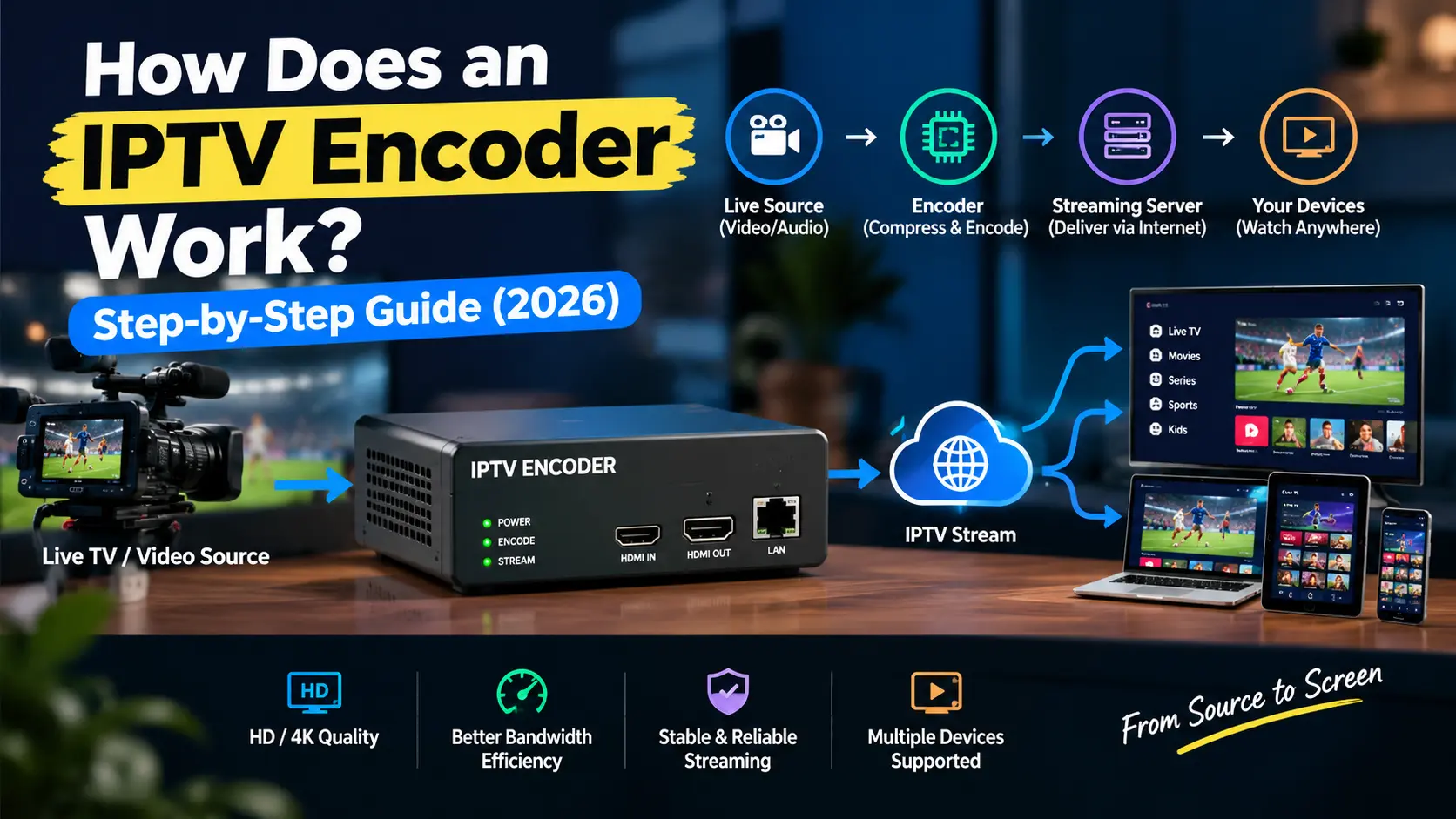
An IPTV encoder converts a video signal into a compressed digital stream that can travel over an IP network. It can receive video from a TV channel, camera, satellite receiver, or other source and prepare it for live streaming.
So, how does an IPTV encoder work? It receives the video and audio, processes the signals, compresses them using a codec such as H.264 or H.265, and prepares the stream for network delivery.
The encoded stream can then be sent to a streaming server or CDN and delivered to viewers on Smart TVs, IPTV boxes, Fire TV devices, smartphones, computers, and other supported devices.
In this guide, you’ll learn how IPTV encoding works step by step, including video compression, bitrate, resolution, codecs, streaming protocols, latency, 4K, and common encoder problems.
What Is an IPTV Encoder?
An IPTV encoder is a hardware device or software application that converts a video and audio source into a digital stream suitable for delivery over an IP network.
For example, a camera may produce a video signal that cannot be sent directly through an IPTV streaming system. The encoder processes and compresses that signal into a format that a streaming server and compatible player can handle.
An IPTV video encoder can use codecs such as H.264 or H.265/HEVC and support protocols such as RTMP, SRT, or HLS, depending on the system.
In simple terms:
Video Source → IPTV Encoder → Streaming Server/CDN → Viewer
How Does an IPTV Encoder Work?
The IPTV encoding process usually involves several stages. Each stage prepares the video for efficient and reliable delivery.
Step 1: Capture the Video Source
The process starts with a video source.
An IPTV encoder can receive content from:
- Camera
- TV channel
- Satellite receiver
- Set-top box
- Computer
- Broadcast feed
- Other video equipment
The source may also provide an audio signal. The encoder receives both signals and prepares them for processing.
Step 2: Process the Video and Audio
The encoder first processes the incoming video and audio.
This may include adjusting the resolution, frame rate, audio format, and other source settings. The goal is to prepare the content for the required streaming format.
For example, a high-resolution source may be converted to HD when lower bandwidth is required.
Step 3: Compress the Video
Raw video contains a large amount of data. Sending it without compression would require much more bandwidth.
The encoder uses a video codec to reduce data while maintaining acceptable picture quality.
Two common options are:
- H.264: Broad compatibility and good compression.
- H.265/HEVC: More efficient compression and useful for higher-resolution video when supported.
Step 4: Apply Encoding Settings
The encoder applies settings that control how the stream looks and performs.
Important settings include:
| Setting | What It Controls |
|---|---|
| Resolution | Video size and detail |
| Bitrate | Data used by the stream |
| Frame rate | Smoothness of motion |
| Video codec | Video compression |
| Audio codec | Audio compression |
| Keyframe interval | Stream timing and playback behavior |
These settings should match the source, network capacity, streaming platform, and viewer devices.
Step 5: Package the Stream
The compressed video and audio are organized into a stream that contains the information needed for playback.
This stage keeps video, audio, and timing information together so that the viewer can receive synchronized content.
The exact container or stream format depends on the encoding and delivery system.
Step 6: Send the Stream Over an IP Network
The encoder sends the prepared stream through an IP network using a suitable streaming protocol.
Common protocols include:
- RTMP: Often used to send live video from an encoder to a streaming server.
- SRT: Designed for reliable video transmission across networks where packet loss or unstable connections may occur.
- HLS: Uses HTTP and video segments that compatible players can load and play.
The protocol can affect factors such as latency, reliability, and delivery performance.
Step 7: Streaming Server or CDN Delivers the Content
The encoded stream usually reaches a streaming server before being delivered to viewers.
A CDN (Content Delivery Network) can distribute the content through multiple locations. This can help deliver streams to viewers in different regions.
The delivery path looks like this:
Video Source → IPTV Encoder → Streaming Server → CDN → Viewer
Step 8: The Viewer Device Decodes the Stream
The final stage takes place on the viewer’s device.
The viewer may use:
- Smart TV
- IPTV box
- Fire TV
- Android TV
- Smartphone
- Tablet
- Computer
- IPTV player
The device uses a decoder or compatible media player to process the compressed stream and turn it back into playable video and audio.
The Complete IPTV Encoding Process
The entire workflow can be summarized as:
Video Source → Processing → Compression → Encoding Settings → Stream Packaging → Streaming Protocol → Server/CDN → Decoder → Screen
In simple terms, an IPTV encoder compresses video to make it suitable for internet delivery. The streaming system then transports it to the viewer, where the device decodes and plays it.
What Are the Main Types of IPTV Encoders?
There are two main types of IPTV encoders: hardware and software.
Hardware IPTV Encoder
A hardware IPTV encoder is a dedicated physical device designed to process video in real time.
Depending on the model, it may include HDMI, SDI, or other video inputs. Hardware encoders are commonly used for live TV, broadcasting, events, sports, and continuous streaming.
Some models are sold as an IPTV encoder box, allowing a video source to be connected directly to the device.
Software IPTV Encoder
A software IPTV encoder runs on a computer or server. It uses the system’s CPU or GPU to process and encode video.
Software encoders can provide more flexibility and control over encoding settings. They can also be updated without replacing physical hardware.
Hardware vs Software IPTV Encoder
| Feature | Hardware Encoder | Software Encoder |
|---|---|---|
| Form | Dedicated device | Computer or server software |
| Processing | Dedicated hardware | CPU/GPU |
| Flexibility | Moderate | High |
| Setup | Dedicated equipment | Requires suitable computer/server |
| Common use | Professional live streaming | Flexible streaming setups |
The right option depends on the source, required resolution, workload, available hardware, and budget.
What Is an HDMI Encoder for IPTV?
An HDMI encoder for IPTV converts video from an HDMI source into a digital stream that can be transmitted over an IP network.
For example, an HDMI to IPTV encoder can connect a camera, computer, set-top box, or other HDMI source to a streaming system.
You may also see related terms such as HDMI encoder IPTV, HDMI IPTV encoder, or simply HDMI encoder when researching this type of equipment.
The exact features depend on the encoder model. Some support HD, while others can handle 4K video and multiple streaming protocols.
Which Video Codecs Are Used in IPTV Encoding?
A video codec determines how video is compressed and prepared for streaming. It affects bandwidth usage, picture quality, processing requirements, and device compatibility.
The two codecs most relevant to this workflow are H.264 and H.265/HEVC.
H.264
H.264, also known as AVC, is widely supported across TVs, computers, mobile devices, and streaming players.
It offers a practical balance between video quality, compression, and compatibility. This makes it common in HD IPTV streaming and many IPTV HD encoder setups.
H.265/HEVC
H.265, also known as HEVC, provides more efficient compression than H.264.
It can be useful for higher-resolution video, including 4K streaming. However, the encoder, server, and viewer device must support HEVC.
H.264 vs H.265 for IPTV
| Feature | H.264 | H.265/HEVC |
|---|---|---|
| Compression | Good | More efficient |
| Device support | Very broad | Depends on device |
| Bandwidth use | Higher | Lower |
| HD streaming | Excellent | Excellent |
| 4K streaming | Supported | Well suited |
H.264 is generally a practical choice when compatibility is the priority. H.265/HEVC can reduce bandwidth requirements when supported by the complete streaming system.
What Is the Difference Between an IPTV Encoder and Decoder?
An encoder works on the sending side, while a decoder works on the receiving side.
| Feature | IPTV Encoder | IPTV Decoder |
|---|---|---|
| Main job | Encodes and compresses video | Decodes compressed video |
| Location | Sending side | Viewer side |
| Input | Video and audio source | Digital stream |
| Output | Network-ready stream | Playable video and audio |
| Common use | Broadcasting and live streaming | IPTV playback |
| Example | Camera feed to internet stream | Internet stream to TV |
The simple relationship is:
Source → Encoder → Network → Decoder → Screen
IPTV Encoder vs Transcoder: What Is the Difference?
An encoder converts a source video signal into a digital stream.
A transcoder works with an existing digital stream and converts it into another resolution, bitrate, codec, or format.
For example, an encoder may create a 4K stream from a camera source, while a transcoder may create additional HD and SD versions for viewers with different bandwidth levels.
What Streaming Protocols Do IPTV Encoders Use?
IPTV encoders can support different streaming protocols depending on the workflow.
RTMP
RTMP is commonly used to send live video from an encoder to a streaming server.
SRT
SRT is designed for reliable live video transmission and can help maintain delivery over challenging networks.
HLS
HLS delivers video using HTTP and segmented media files. It is widely supported by modern streaming systems and compatible players.
The right protocol depends on the required latency, compatibility, reliability, and delivery method.
Which IPTV Encoder Settings Matter Most?
Several settings can affect IPTV streaming quality.
Resolution
Higher resolutions provide more detail but generally require more data.
Bitrate
Bitrate determines how much data the stream uses. Too little bitrate can reduce picture quality, while excessive bitrate can increase bandwidth requirements.
Frame Rate
Frame rate controls how many frames are displayed each second. Higher frame rates can make motion look smoother.
Keyframe Interval
Keyframes provide reference points in the video stream. The correct interval can depend on the streaming platform and protocol.
Audio Settings
Audio codec and bitrate also affect sound quality and overall stream size.
For reliable streaming, these settings should work together rather than being adjusted separately.
How Does an IPTV Encoder Affect Streaming Quality?
An IPTV encoder has a direct effect on video quality, but it is only one part of the streaming system.
The overall viewing experience depends on:
Source Quality → Encoder → Bitrate → Network → Server/CDN → Player → Viewer Device
A high-quality source can still produce poor video if the encoder uses unsuitable settings.
Likewise, a properly configured encoder cannot fix every problem caused by network congestion, packet loss, server overload, or an incompatible playback device.
What Causes High Latency in IPTV Encoding?
Latency is the delay between the original video source and what the viewer sees.
Several stages can add delay:
- Video capture
- Encoding
- Stream packaging
- Network transmission
- Server processing
- CDN delivery
- Player buffering
- Device decoding
The selected streaming protocol and player configuration can also affect latency.
Low latency is particularly useful for live sports, news, events, and other real-time broadcasts.
What Equipment Do You Need for IPTV Encoding?
A basic IPTV encoding setup may include:
1. Video Source
A camera, TV channel, satellite receiver, computer, or other source provides the original content.
2. IPTV Encoder
The encoder processes and compresses the incoming video and audio. Depending on the source, you may need an HDMI encoder, SDI encoder, or another compatible input type.
3. Network Connection
The encoded stream needs a stable connection for transmission.
4. Streaming Server
The server receives and manages the encoded stream before delivering it to viewers.
5. CDN
A CDN can distribute content through multiple network locations for viewers in different regions.
6. IPTV Player or Decoder
The viewer needs a compatible device or player to decode and play the stream.
A basic workflow looks like this:
Camera/TV Source → IPTV Encoder → Internet → Server/CDN → IPTV Player → TV
Can an IPTV Encoder Stream 4K Video?
Yes. A 4K IPTV encoder can encode 4K video when the source, encoder, network, server, and playback device support the required specifications.
A 4K workflow may require:
- 4K video source
- 4K-capable encoder
- Suitable bitrate
- Sufficient network bandwidth
- Compatible streaming server/CDN
- 4K playback device
- Supported codec such as H.265/HEVC
Simply having a 4K encoder does not guarantee that viewers will receive 4K quality. Every part of the delivery chain must support it.
How Do You Choose the Best Encoder for IPTV?
The best encoder for IPTV depends on your streaming requirements rather than one universal specification.
Before choosing an encoder, check:
- Video input type
- Supported resolution
- H.264/H.265 support
- Maximum bitrate
- HDMI or SDI connectivity
- Streaming protocols
- Number of simultaneous streams
- Hardware or software design
- Required latency
- Network requirements
For example, an HDMI source may require an HDMI encoder, while a professional broadcast workflow may require SDI connectivity.
7 Common IPTV Encoder Problems and Solutions
Streaming problems can occur at different points in the delivery chain.
Insufficient Bandwidth
If available bandwidth is lower than the stream’s bitrate, buffering or freezing may occur.
Solution: Reduce the bitrate or improve network capacity.
Incorrect Bitrate
A very low bitrate can reduce picture quality, while an unnecessarily high bitrate increases bandwidth requirements.
Solution: Match the bitrate to the resolution, codec, and available network.
Network Congestion
Heavy traffic can affect stream delivery, especially when several devices share the same connection.
Solution: Reduce network usage or use a more stable connection.
Packet Loss
Lost packets can cause freezing, glitches, dropped frames, or interruptions.
Solution: Check the network connection between the encoder, server, and viewer.
Incorrect Encoder Settings
Wrong resolution, frame rate, codec, or keyframe settings can affect playback.
Solution: Review the encoder configuration and match it to the streaming requirements.
Codec Compatibility
Some devices may not support certain video or audio codecs.
Solution: Use a widely supported codec such as H.264 when broad compatibility is important.
Server or Device Problems
An overloaded server, CDN, IPTV player, or viewer device can also affect playback.
Solution: Check the complete streaming chain instead of assuming the encoder is the problem.
Is an IPTV Encoder the Same as an IPTV Box?
No. An IPTV encoder prepares video for network delivery, while an IPTV box is generally used on the viewer side to receive and play IPTV content.
In simple terms:
Encoder = prepares the stream
IPTV box = plays the stream
They perform different jobs in the IPTV workflow.
Do You Need an IPTV Encoder to Watch IPTV?
No. Viewers normally do not need an IPTV encoder.
An encoder is mainly used by broadcasters, content owners, live-streaming operators, and other organizations that need to convert a video source into a network stream.
To watch IPTV, you generally need a compatible service, player, internet connection, and playback device.
Why Is Video Compression Needed for IPTV?
Video compression reduces the amount of data needed to transmit video over the internet.
It helps save bandwidth while maintaining suitable picture quality. Without compression, live video would require much more network capacity.
Is H.264 or H.265 Better for IPTV?
H.264 offers wider device compatibility, while H.265/HEVC provides more efficient compression and can reduce bandwidth requirements.
H.264 is useful when compatibility is the priority. H.265 can be useful for higher-resolution video when supported by the encoder and playback device.
The content is really great