To watch IPTV on Plex, connect your M3U playlist and XMLTV guide to an M3U proxy such as Threadfin, then add that proxy to Plex Media Server as a Live TV tuner. Plex doesn’t officially document a way to paste a standard IPTV M3U playlist directly, so the proxy fills that gap by presenting your channels to Plex as a tuner source.
Threadfin is an M3U proxy for Plex, Jellyfin, and Emby, forked from xTeVe. It lets you filter and group channels, map guide data, and expose everything to Plex in a form it understands.
So, in simple terms:
IPTV M3U + XMLTV EPG → Threadfin/xTeVe → Plex Media Server → Plex Live TV
This guide explains how to add IPTV to Plex, configure EPG data, set up DVR where supported, fix common problems, and improve playback quality.
What is IPTV in Plex?
IPTV on Plex lets you watch live TV channels from your IPTV provider using your M3U playlist and XMLTV EPG. Because Plex doesn’t natively support IPTV, a proxy tool such as xTeVe is required to connect your IPTV service to Plex.

In order to watch and record IPTV on Plex, you need four essential components:
- An IPTV Subscription: A service that provides an M3U playlist and XMLTV (EPG) file.
- Plex Media Server: Installed and configured on your computer or NAS to manage IPTV channels and media.
- A Plex Pass: Required to unlock Live TV and DVR features.
- Middleware: Threadfin or xTeVe middleware.
- An IPTV Proxy Tool: Software such as xTeVe that converts your IPTV playlist into a tuner that Plex can recognize.
- Plex Pass: If you want DVR recording (basic live TV works on the free Plex version in 2026), it is essential.
| Disclaimer: This guide is for educational purposes only. Use IPTV services that have the proper rights to distribute content. You are responsible for complying with your local copyright laws and your IPTV provider’s terms of service. |
Can You Use IPTV with Plex?
Yes, you can use IPTV with Plex, but Plex does not treat a normal M3U playlist like a standard media library.
The usual solution is to place a middleware layer between IPTV and Plex. Threadfin or xTeVe reads your M3U playlist and XMLTV guide, organizes the channels, and then presents them to Plex as a tuner-style source.
This approach makes Plex with IPTV much more practical because you can manage live channels through Plex’s Live TV interface rather than switching between separate IPTV apps.
How does the IPTV in Plex Setup work?
Plex doesn’t natively support M3U IPTV playlists. To stream IPTV, you’ll need a tuner emulator like xTeVe or Telly. It allows Plex to detect IPTV channels as a compatible TV tuner.
- Add your M3U playlist and XMLTV (EPG) file to a tuner emulator such as xTeVe or Telly.
- The emulator matches channels with the TV guide and assigns channel numbers.
- It creates a virtual TV tuner that Plex can recognize.
- Connect the virtual tuner to Plex Live TV & DVR during setup.
- Once configured, you can browse Plex Live TV IPTV channels, view the EPG, and record supported IPTV content from a single interface.
| Expert Tip: For the best Plex IPTV experience, use Threadfin instead of xTeVe if you’re starting from scratch. It offers better stability, easier channel management, and more reliable EPG mapping for large IPTV playlists. |
Why You Should Add IPTV to Plex?
Using IPTV with Plex lets you watch live TV and manage your personal media library from one interface. It also provides EPG support, DVR recording, centralized content management, and seamless streaming across all Plex-compatible devices.
- Unified Streaming Dashboard: Access live IPTV channels, sports streams, and personal movie and TV libraries from a single centralized interface.
- Integrated TV Guide (EPG): Combine IPTV playlists with a native electronic program guide (EPG) for structured channel browsing, schedules, and program navigation.
- Cloud DVR & Live Recording: Schedule and store live TV recordings directly on your server or NAS, keeping content under your control instead of device storage.
- Remote Streaming Access: Watch live TV and library content securely from anywhere outside your home network using internet-based access.
- Cross-Device Support: Stream seamlessly on iOS, Android, Apple TV, Roku, Smart TVs, and web apps without relying on third-party IPTV players.
How IPTV and Plex Work Together
The easiest way to understand IPTV Plex integration is to follow the signal path.
Step 1: IPTV Playlist
Your IPTV source provides an M3U playlist containing channel names and stream URLs.
Step 2: EPG Data
An XMLTV file or URL provides channel-guide information such as program names, schedules, and descriptions.
Step 3: Threadfin or xTeVe
The middleware imports the playlist, filters unwanted channels, maps EPG information, and presents the selected streams in a way Plex can discover.
Step 4: Plex Media Server
Plex adds the virtual tuner through Settings → Live TV & DVR and displays the channels inside the Plex interface.
Step 5: Plex Apps
You can then watch supported live channels through Plex apps on platforms such as Fire TV, Android TV, Apple TV, Roku, mobile devices, desktop apps, and supported Smart TVs. Plex lists these among the apps that support its Live TV and DVR features.
The 3 Setup Methods for IPTV on Plex
Let’s check the 3 Plex IPTV setup procedures you can use to enhance your streaming experience.
| Method | Difficulty | Best For | DVR Support |
| Threadfin middleware | Medium | Most users in 2026 | Yes (Plex Pass) |
| xTeVe middleware | Medium | Users with an existing xTeVe setup | Yes (Plex Pass) |
| Plex Custom Tuner (M3U direct) | Easy | Small playlists, no EPG needed | Limited |
Most users in 2026 should choose Threadfin. It is the most stable, the most actively maintained, and supports everything xTeVe does, plus a few features the older tool does not. The rest of this guide focuses on Threadfin with a shorter section on xTeVe and the Plex direct method.
Comparison Table for Threadfin, xTeVe and direct m3u || How to install IPTV on Plex
| Feature | Threadfin | xTeVe | Direct M3U |
| EPG | Yes | Yes | Limited |
| DVR | Yes | Yes | Limited |
| Active Development | Yes | ❌ | Plex |
| Best Choice | ⭐⭐⭐⭐⭐ | ⭐⭐⭐ | ⭐⭐ |
How to Install IPTV on Plex (M3U & XMLTV Setup Guide)
Want to watch live IPTV channels in Plex? This guide shows you how to add IPTV to Plex using an M3U playlist and XMLTV EPG. As a result, you can stream live TV, browse channel schedules, and manage everything from a single, unified interface.
Now, I’ll start with the most advanced setup process through Plex:
1st Method: Setting Up Your Plex IPTV with Threadfin
Threadfin is an actively maintained fork of xTeVe designed to integrate IPTV streams with media servers such as Plex, Emby, and Jellyfin. It supports M3U playlists, XMLTV EPG data, channel mapping, and virtual HDHomeRun emulation.
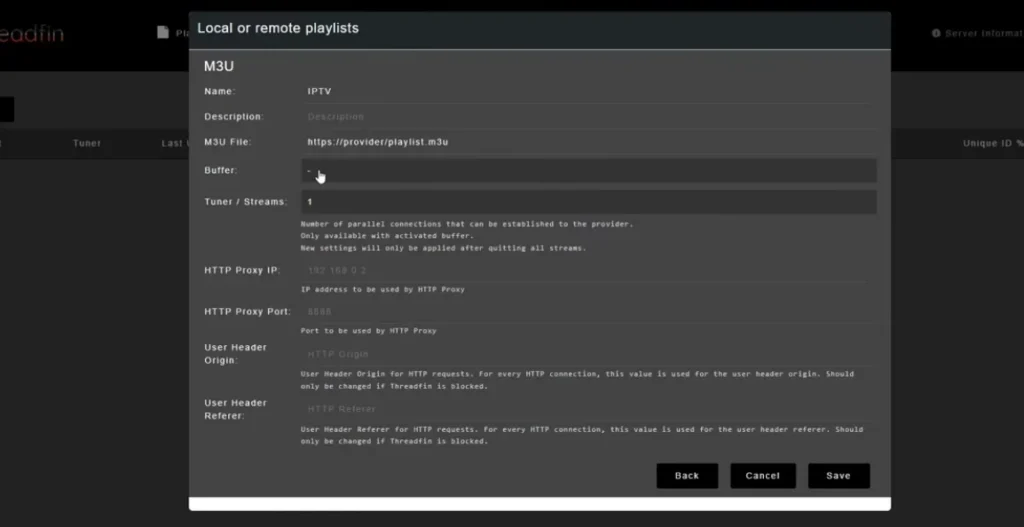
It improves IPTV streaming by acting as a bridge between M3U playlists and media libraries, offering better control, mapping, and reliability.
The official Threadfin documentation highlights features such as RAM-based buffering, automatic M3U and XMLTV synchronization, channel filtering, backup channel support, and HDHomeRun-compatible tuner emulation.
During my testing, Threadfin handled large IPTV playlists more reliably than xTeVe and required fewer manual EPG corrections.
Key Features:
- Modern Bootstrap-based UI for easier navigation
- RAM-based buffering for smoother, faster streaming
- Auto-merge & sync of M3U playlists and XMLTV EPG data
- Advanced channel filtering, bulk editing, and backup channel assignment
- Precise channel mapping for accurate lineup control
- Custom channel ordering for a cleaner viewing experience
- Improved stability and performance over xTeVe
Here’s the step-by-step, complete Plex IPTV guide:
1st Step: Install Plex Media Server
So, you don’t have a Plex Media Server? No worries! Install it easily using the method below:
Plex is a home media server that lets you stream movies, TV shows, and personal media across devices. Download it from here – Plex Media Server Downloads.
For Windows & macOS
- Download Plex Media Server from the official download page
- Run the installer and follow the setup steps in Windows OS (Win 10 and 11)
- Launch Plex → it will open the web setup wizard automatically
- If not, open Plex from the system tray (Windows) or menu bar (Mac)
For Linux (Ubuntu/Debian)
On Linux (Ubuntu/Debian), it’s best to install Plex using the official APT repository so it updates automatically. Run the following commands in your terminal:
Bash
# Add the Plex GPG signing key
curl https://downloads.plex.tv/plex-keys/PlexSign.key | sudo gpg –dearmor -o /usr/share/keyrings/plex-archive-keyring.gpg
# Add the Plex repository
echo “deb [signed-by=/usr/share/keyrings/plex-archive-keyring.gpg] https://downloads.plex.tv/repo/deb public main” | sudo tee /etc/apt/sources.list.d/plexmediaserver.list
# Update your system packages
sudo apt update
# Install the server
sudo apt install plexmediaserver -y
Setup at Early Stage
After installing Plex, open your web browser to complete the initial setup and configuration.
- Sign in to Plex or create a new account
- Name your server in the setup wizard
- Click Next to continue the setup
- Add media libraries (Movies, TV Shows, Music)
- Select correctly organized folders from your hard drive
You can pay a monthly charge for premium features such as parental controls, webhooks, Live TV & DVR, and more exclusive features.
2nd Step: Install and Configure Threadfin
Install Threadfin: Install Threadfin using Docker (recommended).
Open the WebUI: Visit http://<YOUR-SERVER-IP>:34400.
Add your Plex M3U playlist: Go to Settings → M3U and enter your M3U playlist URL.
Add EPG: Go to Settings → XMLTV and add your XMLTV (EPG) URL.
Map Channels: In Mapping, match IPTV channels with EPG data and verify channel names and numbers.
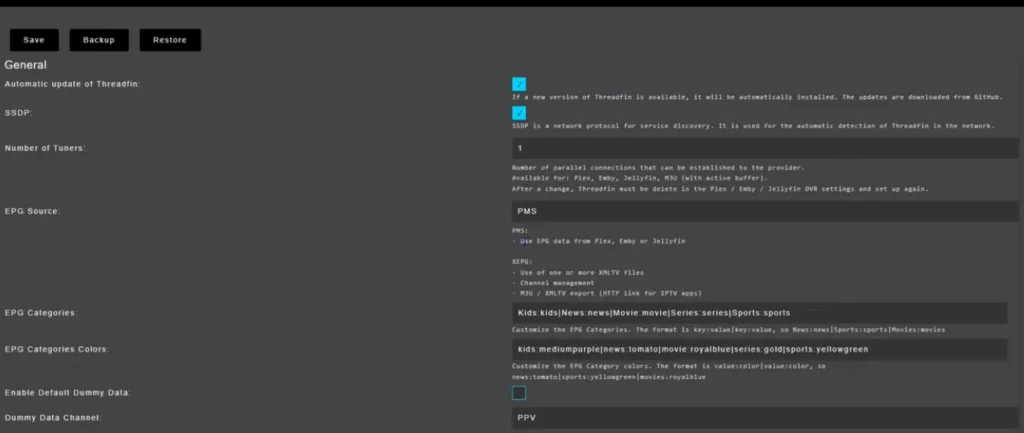
Note: Click the Update icon to automatically install the latest version of Threadfin. SSDP (Simple Service Discovery Protocol) allows Plex and other media servers to automatically detect Threadfin on your local network. Also, choose XEPG over PMS, as it gives you full control over your TV guide data.
3rd Step: Channel Filtering
Now, you’ll have to activate channels. Since Plex can’t load more than 480 channels, you need to filter out channels even if your IPTV service provider offers 10K+ live TV channels. Here’s the process:
- Go to Filter in the Threadfin web interface.
- Type a category like US, UK, Canada, or your country to filter the list.
- Save the filter. Threadfin will only pass these channels to Plex.
For most households, filtering down to 200-400 channels covering news, sports, kids, movies, and a few entertainment groups provides the best experience.
4th Step: Map Channels to EPG
This is the step that takes the most time. Threadfin tries to automatically match channels to EPG data, but you will need to manually fix a few.
- Go to Mapping in the Threadfin web interface.
- Channels in green are correctly mapped to EPG.
- Channels in red are missing EPG data and will not work in Plex until mapped.
- Right-click a red channel and choose the matching EPG entry from the dropdown.
- Save when done.
Honest note from testing: expect to spend 20-30 minutes on initial channel mapping. After that, it is a one-time job.
5th Step: Connect Plex to Threadfin
- Open the Plex web interface and click Settings (wrench icon).
- Go to Live TV & DVR.
- Click Set Up Plex DVR.
- Plex looks for tuners. Threadfin should appear as an HDHomeRun device on your server at the IP address and port 34400.
- Select it and click Continue.
- Confirm your country.
- Plex scans channels. You should see all your filtered channels appear.
6th Step: Set Up the EPG Source
- After channel scanning, Plex prompts for an EPG source.
- Choose Have an XMLTV Guide on Your Server?.
- Enter the Threadfin XMLTV URL: http://your-ip:34400/xmltv/threadfin.xml.
- Plex pairs channels to EPG using their tvg-id attributes.
Threadfin can also generate a tailored XMLTV file optimized for Plex, accessible from the Threadfin web interface.
Last Step: Watch IPTV in Plex
- Open the Plex app on any device (Apple TV, Firestick, iPhone, iPad, Smart TV, web).
- Navigate to Live TV & DVR.
- Pick a channel and start watching.
That is the complete setup. Once it is running, you have IPTV with a polished EPG grid, channel logos, on-screen guide, and Plex’s remote access on every device you own.
2nd Method: How to Put IPTV on Plex Via xTeVe (Classic)
xTeVe acts as a virtual HDHomeRun tuner, allowing Plex to stream IPTV channels using M3U playlists and XMLTV EPG data.
Step 1: Install xTeVe
- Install xTeVe using Docker (recommended).
- Open the WebUI at http://<YOUR-SERVER-IP>:34400.
Step 2: Configure xTeVe
- Add your M3U playlist to Playlist.
- Add your XMLTV (EPG) in XMLTV.
- Filter channels to keep the list under 500.
- Map channels to the correct EPG listings.
Step 3: Connect xTeVe to Plex
- Open Plex → Settings → Live TV & DVR.
- Click Set Up Plex DVR.
- Select the xTeVe (HDHomeRun) tuner or enter its IP address.
Step 4: Add the TV Guide
- Enter the XMLTV URL generated by xTeVe.
- Finish channel mapping and save the setup.
You can now stream IPTV channels from the Live TV & DVR section in Plex.
3rd Method: Plex’s New Built-In M3U Tuner Method
In 2025 and 2026, Plex quietly added the ability to add a custom M3U tuner without middleware. This is the simplest method, but it lacks the channel mapping and EPG management features of Threadfin or xTeVe.
- Open the Plex web interface and go to Settings, then Live TV & DVR.
- Click Set Up Plex DVR.
- When Plex says no tuners are found, click Don’t See Your Device? At the bottom.
- Choose Add Custom Tuner.
- Paste your IPTV M3U URL directly.
- Plex scans channels.
- When prompted, paste your XMLTV EPG URL.
This works well for small playlists under 480 channels with clean TVG-ID attributes. For larger or messier playlists, Threadfin or xTeVe are still better choices because they let you filter and remap channels.
How to Set Up Plex DVR IPTV Recording
Plex does not natively support M3U IPTV playlists, so you must use a proxy like xTeVe or Threadfin to convert IPTV streams into a virtual DVR (HDHomeRun).
Requirements
- IPTV provider with M3U playlist URL and XMLTV EPG
- xTeVe or Threadfin (Docker recommended)
- Updated Plex Media Server
Configure xTeVe / Threadfin
- Open WebUI: http://<server-ip>:34400
- Add M3U playlist
- Add XMLTV (EPG) guide
- Filter channels (keep under ~400 for stability)
- Save configuration
Connect to Plex
- Go to Plex → Live TV & DVR
- Click Set Up Plex DVR
- Select or manually enter xTeVe IP (:34400)
- Scan channels and map EPG data
- Save setup
Result
Your IPTV channels appear in Plex Live TV with a full program guide, DVR support, and virtual antenna setup.
How to Watch IPTV on Plex: 5 Common Problems & Fixing
| Problem | Reasons for it | Solution |
| Plex cannot find Threadfin or xTeVe | Wrong IP address or port blocked | Use the server’s LAN IP; confirm port 34400 is open in the firewall |
EPG is blank in Plex | XMLTV URL not configured or tvg-id mismatch | Verify the XMLTV URL works in the browser, and check the channel mapping in Threadfin |
| Channels show “Not Available” | Channel mapping incomplete | Open the Threadfin Mapping tab and manually map the red channels |
Buffering on every stream | Server hardware bottleneck or slow internet | Add hardware transcoding (Intel Quick Sync), switch to wired Ethernet, lower stream quality |
| Plex hits 480 channel limit | Playlist too large | Filter channels in Threadfin to under 480 |
| Codec not supported error | IPTV stream uses HEVC or AV1 without transcoding | Enable hardware acceleration on Plex Server (Settings, Transcoder) |
6 Performance Optimization Tips for How to Watch IPTV on Plex
To improve IPTV streaming performance in Plex, optimize network stability, transcoding, and EPG data handling.
1. Use a Wired Ethernet Connection
Connect your Plex server via Ethernet instead of Wi-Fi to ensure stable IPTV streaming and reduce buffering.
2. Enable Hardware Transcoding
Turn on hardware transcoding (Intel Quick Sync or NVIDIA GPU) in Plex settings to reduce CPU load and support multiple streams.
3. Limit Remote Streaming Quality
Set remote playback to 720p or 1080p to prevent bandwidth overload and buffering on IPTV streams.
4. Optimize XMLTV (EPG) Size
Keep your XMLTV guide under ~100MB and limit it to 3–7 days of program data for faster loading.
5. Reduce Active Channel Count
Limit IPTV channels to only frequently used categories (e.g., sports, movies, news) to improve guide loading and navigation speed.
6. Use SSD Storage for Plex Library
Install Plex Media Server on an SSD to speed up database reads, metadata loading, and DVR responsiveness.
Plex Does Not Detect Threadfin or xTeVe
If Plex cannot find the virtual tuner:
- Confirm Threadfin/xTeVe is running.
- Open its web interface from another device on the network.
- Verify Plex and the middleware are on the same network.
- Check firewall rules.
- Restart Threadfin/xTeVe.
- Restart Plex Media Server.
- Run tuner discovery again.
Plex says its tuner setup automatically searches the network for compatible devices and also notes that unsupported tuners may sometimes be usable, though they are not officially supported.
IPTV Channels Buffer in Plex
Buffering can happen at several different points:
IPTV provider → internet connection → Threadfin/xTeVe → Plex server → client device
Before blaming Plex, test the original channel stream independently.
If the original stream buffers, Plex will not be able to fix the upstream problem.
If the source works correctly outside Plex but buffers inside Plex, check:
- Plex transcoding
- CPU usage
- network speed
- Threadfin buffer configuration
- concurrent streams
- client codec support
Plex Shows the Wrong Channel Guide
This almost always points to EPG mapping.
For example, the playlist channel might use:
Plain textBBC ONE UK HD |
while the XMLTV guide uses:
Plain textBBC One |
Threadfin cannot always automatically know that these are the same channel.
Manually map the playlist channel to the correct XMLTV entry and refresh the guide.
Is IPTV on Plex Legal?
Using Plex for IPTV is not inherently illegal.
The legal issue is whether you are authorized to access and distribute the content in your IPTV streams.
Plex is a media-server platform, while Threadfin and xTeVe are playlist/tuner tools. They do not give users redistribution rights to copyrighted channels.
Use:
- legally obtained IPTV subscriptions
- your own streams
- free-to-air sources where lawful
- properly licensed content
Avoid unauthorized copyrighted streams.
Is Plex Good for IPTV?
Plex can be a good option if you already use Plex and want your live channels integrated into the same interface as your personal media.
The main advantages are:
- one media interface
- program guide
- support for many devices
- DVR integration
- remote access through Plex
- centralized server management
However, Plex TV IPTV setups require more configuration than a dedicated IPTV player.
If you simply want to open an M3U playlist and start watching immediately, a normal IPTV player is usually easier.
Plex is most useful when you specifically want IPTV integrated into a wider home-media server.
Final Say – How to Set Up IPTV with Plex in 2026
If you’re starting fresh in 2026, Threadfin is the best way to watch IPTV on Plex. It offers the easiest setup, better EPG management, and more reliable performance than xTeVe. Once configured, Plex becomes a complete live TV and media hub with DVR, channel guides, and remote streaming.
Integrate this with the best IPTV service subscriptions – your entertainment experience will be unbeatable.
FAQs on Plex IPTV Installation Guide
Can I use IPTV on Plex?
Yes. A common method is to run the IPTV M3U playlist through Threadfin or xTeVe, which presents the channels to Plex as a tuner-style source.
How do I add IPTV to Plex?
Install Threadfin or xTeVe, import your M3U playlist and XMLTV guide, filter and map the channels, then add the virtual tuner through Plex’s Live TV & DVR settings.
Can Plex play an M3U playlist directly?
Plex’s current official Live TV documentation focuses on tuner devices rather than a native M3U playlist input. Using middleware such as Threadfin or xTeVe is therefore the more established approach.
Do I need Plex Pass for IPTV?
It depends on the feature. Plex says recording with DVR requires an active Plex Pass. Threadfin’s project documentation also lists Plex Pass among its Plex requirements.
Can I record IPTV with Plex?
Potentially, yes. If Plex recognizes the IPTV streams through the virtual tuner and they are compatible, Plex DVR can record them. DVR recording requires Plex Pass.
What is the best IPTV plugin for Plex?
There is no current official Plex IPTV plugin that I recommend. Threadfin and xTeVe are separate applications that act as M3U proxies and virtual tuner bridges rather than traditional Plex plugins.
Is Threadfin better than xTeVe?
For a new setup, Threadfin is often the easier choice because it builds on xTeVe while adding newer mapping and channel-management features. xTeVe remains useful, especially for existing installations.
Why is IPTV buffering on Plex?
Common causes include unstable IPTV streams, Wi-Fi problems, Plex transcoding, insufficient server performance, high concurrent usage, and codec incompatibility.
Does IPTV work on Plex Server?
Yes, when a compatible bridge such as Threadfin or xTeVe presents the IPTV channels to Plex Media Server as a tuner source.
What IPTV provider should I use with Plex?
Choose an authorized IPTV provider that supplies stable M3U access and preferably XMLTV guide data. Plex compatibility depends more on playlist quality, stream formats, EPG data, and connection reliability than on a specific brand.
Can I play IPTV through Plex?
Yes, but Plex does not natively support most IPTV services. You may need a third-party IPTV tuner, M3U integration, or compatible Plex setup to stream IPTV content through Plex.
Why is Plex not illegal?
Plex itself is legal because it is a media server and streaming platform that can be used with legally obtained content. However, streaming or sharing copyrighted content without permission through Plex may be illegal.
Does Plex Accept M3U?
Plex does not natively support M3U playlists for IPTV. You typically need a third-party solution or compatible IPTV tuner to use an M3U playlist with Plex.
Can Plex integrate with streaming services?
Yes. Plex supports several streaming services and online content sources, but integration varies by service. It does not directly integrate with every third-party streaming platform.
How much does Plex TV cost per month?
Plex is free to use for its core streaming features. Plex Pass costs $6.99 per month and adds premium features such as downloads, DVR, and enhanced playback.
Does Plex track you?
Yes. Plex collects certain data about your device, usage, and viewing activity to operate and improve its services. You can limit some data collection through your privacy settings.
Can I put IPTV on Plex?
Yes, Plex can work with IPTV through compatible third-party tools or setups, but Plex does not natively support IPTV playlists such as M3U for live TV.
Is Plex still good in 2026?
Yes. Plex is still a good choice in 2026 for organizing and streaming your personal media, watching free content, and accessing your library across multiple devices.
Your article helped me a lot, is there any more related content? Thanks!
Your article helped me a lot, is there any more related content? Thanks!
Your point of view caught my eye and was very interesting. Thanks. I have a question for you.
I am truly thankful to the owner of this web site who has shared this fantastic piece of writing at at this place.
I believe you have noted some very interesting details, thankyou for the post.
Can you be more specific about the content of your article? After reading it, I still have some doubts. Hope you can help me.
Thanks for sharing. I read many of your blog posts, cool, your blog is very good.
I was curious if you ever considered changing the structure of your blog? Its very well written; I love what youve got to say. But maybe you could a little more in the way of content so people could connect with it better. Youve got an awful lot of text for only having one or two images. Maybe you could space it out better?