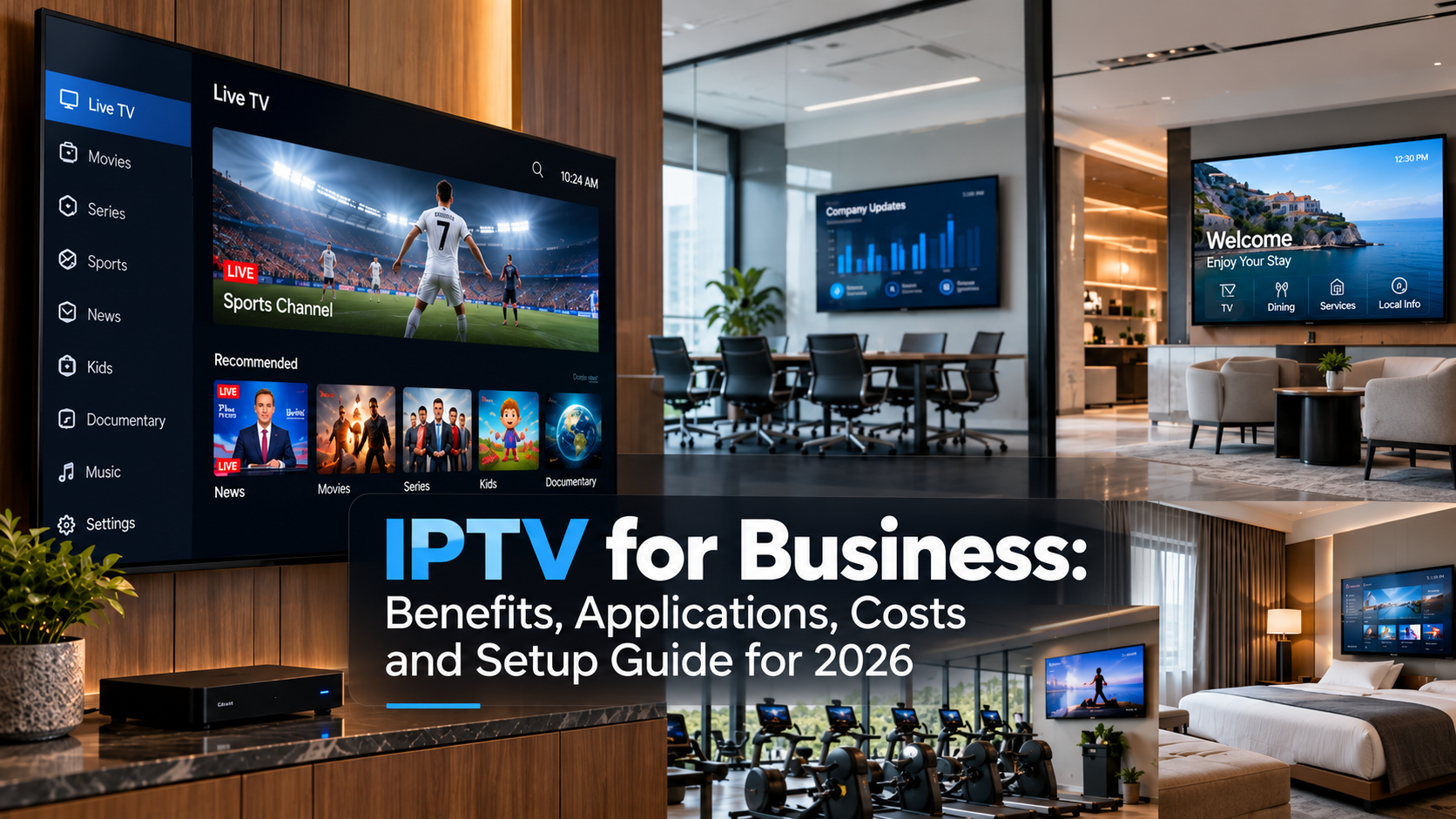
IPTV for business delivers live TV, recorded video and digital signage over your company network instead of cable or satellite. Companies use it for staff broadcasts, training, lobby screens, guest room entertainment and in-store promotions. One system handles it all, controlled from a single dashboard.
The wider IPTV market is still expanding quickly. Fortune Business Insights estimates the global IPTV market at $109.34 billion in 2026 and projects it to reach $330.19 billion by 2034, a CAGR of 14.8%.
Its report also includes corporate and enterprise, healthcare, hospitality and retail among key IPTV end uses.
This guide explains what IPTV for business is, how it works, where companies use it, its main benefits, common costs and what to consider before setting up a commercial IPTV system.
| Key Takeaways One system replaces three. Television, digital signage and internal video run from the same platform and the same dashboard. Budget $5 to $25 per screen monthly for the platform, plus content licensing, hardware and installation. Public viewing needs a commercial license. A residential TV subscription does not cover a lobby, bar, waiting room or guest room. This is the most common and most expensive mistake. Your own content needs no license. Training videos and internal broadcasts are the cheapest, safest place to start. Multicast keeps bandwidth flat. Fifty screens on one channel use one stream, not fifty. Confirm your provider supports it. Allow 5 Mbps per HD stream and 15 to 25 Mbps per 4K stream, tested at your busiest hour. Setup takes two to four weeks for a small office, two to three months for a hotel, hospital or campus. |
What Is IPTV for Business?
Business IPTV is a television and video system that runs over a company’s IP network. It delivers live channels, recorded video, training materials, announcements, and digital signage to smart TVs, commercial displays, set-top boxes, computers, and mobile devices across one or more sites.
In a business environment, IPTV can distribute live channels, recorded video, training material, company announcements and digital signage to Smart TVs, commercial displays, set-top boxes, computers and mobile devices.
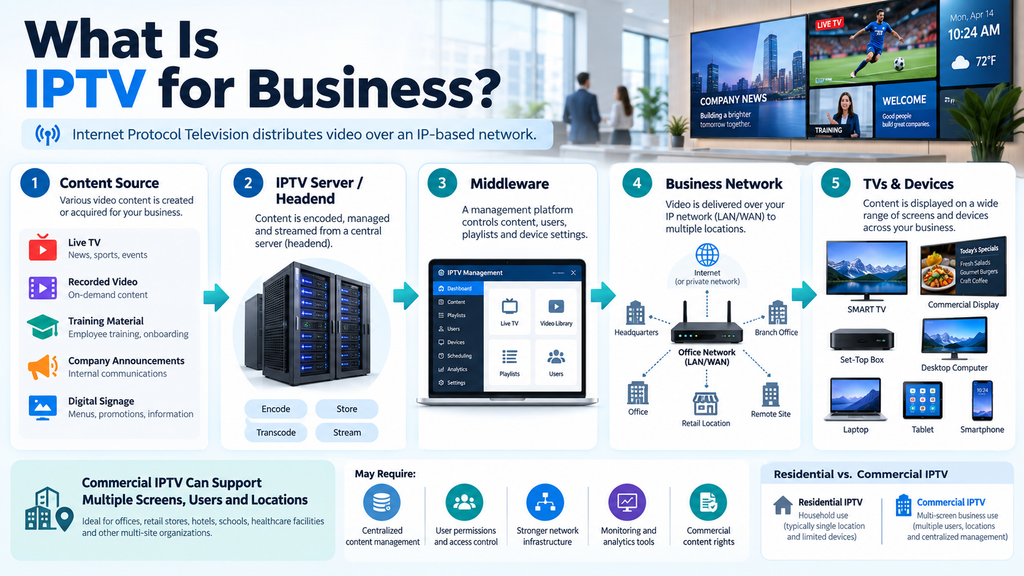
A residential IPTV setup is usually built for a household. Commercial IPTV differs in that it may need to serve multiple screens, users, or locations simultaneously.
A business system may also require centralized content management, user permissions, stronger network infrastructure, monitoring tools and commercial content rights.
In simple terms:
Content source → IPTV server or headend → Middleware → Business network → TVs and devices
That is the basic structure behind most corporate IPTV systems.
Why Businesses Use IPTV
Businesses use IPTV because one system replaces three: television, digital signage and internal video. It costs less than commercial cable, can be managed centrally across all sites, and produces viewing data that traditional broadcast cannot provide.
Companies do not buy IPTV to show television. They buy it because the same network infrastructure handles communication, training, customer engagement and entertainment at once.
Here are the 6 reasons businesses are increasingly dependent on Internet Protocol Television:
One Platform Instead of Several
Most businesses running separate TV, signage and video conferencing setups are paying three licenses and maintaining three systems. IPTV collapses that into one dashboard.
Central Control Across Locations
A retailer updates promotional screens in 40 stores from a single browser window. With cable or standalone signage, that means visiting each site or shipping a USB stick.
Lower Cost than Commercial Cable
Cable contracts bundle channels you never show and lock you in for years. IPTV lets you buy only the channels you need.
It Scales Without Rewiring
Adding a screen means plugging in a device and registering it. No coaxial run, no splitter, no installer visit. Opening a second site means pointing the new network at the same platform.
Consistent Internal Communication
Email works for detail. Video works when the same message has to reach a large group at once. A company can stream an all-hands to every office, meeting room and authorized device simultaneously, then store the recording so anyone who missed it can watch later.
That recording becomes part of a central video library rather than a link buried in someone’s inbox.
It Produces Data
IPTV logs what played on which screen and for how long. Cable produces nothing. For anyone who has to justify screen spend, that difference decides the budget.
It also catches failures. A screen that has been dark for three days shows up in a report rather than going unnoticed for a month.
Where Businesses Use IPTV
IPTV suits any organization that runs video on more than a handful of screens. Hotels use it for guest rooms, offices for staff communication, retailers for promotions, hospitals for patient and staff information, and campuses for lectures and alerts.
| Sector | Main Use | Typical Screens | Feature that Decides the Purchase |
| Hotels | Guest entertainment and property info | 50 to 500 | Integration with the property management system |
| Offices | Internal comms and training | 5 to 50 | Live broadcast plus a searchable recording library |
| Retail | Promotions and product video | 4 to 20 per store | Multi-site scheduling and fast content swaps |
| Healthcare | Patient entertainment, staff notices | 100+ | Zoning that keeps clinical and patient content apart |
| Restaurants and bars | Live sport and menu boards | 6 to 30 | A commercial sport license |
| Education | Lectures, events, emergency alerts | 20 to 200 | Campus-wide override for alerts |
Better Internal Communication
Internal communication is one of the strongest uses of IPTV for businesses.
Email is useful for detailed information, but video can be better when a company needs to deliver the same message to a large group at once.
A business can stream a company-wide meeting to different offices, meeting rooms and authorized employee devices. This is useful for organizations with remote staff or teams working across different locations.
The same system can also store important broadcasts for later viewing.
For example, a company may record a quarterly meeting and make it available as video-on-demand. Employees who missed the live session can watch it later.
This creates a central video library instead of relying only on email attachments, meeting links or separate training systems.
Employee Training and Learning
IPTV can also support employee education.
Training content can be delivered live or stored for on-demand access. A company may use the system for product training, compliance sessions, safety instructions, software tutorials, HR onboarding or sales education.
The advantage is consistency.
Every branch can receive the same training materials, and employees can access recorded sessions when their schedules allow.
For companies with many locations, this can reduce the need to organize the same in-person training session repeatedly.
Digital Signage and Customer Engagement
A business IPTV system can do more than distribute video. It can also work with digital signage.
This is especially useful in customer-facing environments.
A hotel lobby may show local information, promotions and live television. A retail store may display product videos and campaign messages. A hospital waiting area may show health information and entertainment.
The content can be updated via a single management platform.
That means a business does not need to visit every screen to change a message.
If a promotion changes, the new content can be published across many locations at once.
IPTV for Hotels and Hospitality
Hotels are a natural fit for IPTV.
A hospitality IPTV system can provide live television, movies, hotel information and promotional content through guest room TVs.
The same screen can be used for more than entertainment.
A hotel may display restaurant opening times, spa services, checkout information, local attractions or a welcome message.
Larger properties may also connect IPTV with hotel management systems so that content can be personalized by room or guest type.
For hospitality businesses, IPTV can become both an entertainment service and a communication tool.
IPTV for Offices and Corporate Buildings
Corporate offices may use IPTV for internal television, company news, financial channels, training and live events.
A large organization can create different content for different areas.
Reception screens may show visitor information. Employee areas may display internal news. Executive offices may receive business television. Training rooms may access recorded learning content.
This is where corporate IPTV becomes more useful than simply placing a television in every room.
The company gains control over what appears on each screen.
IPTV for Retail Stores
Retail businesses use IPTV to combine video and marketing.
A store may show product demonstrations, advertising, promotional campaigns and branded video.
A large retailer can manage all of these screens centrally.
For example, a new product campaign could be launched across multiple branches simultaneously.
This helps maintain consistent branding and reduces the work required to update each location separately.
The commercial use of digital displays is especially strong in retail. Grand View Research reports that retail represented more than 19% of the global digital signage market in 2025.
IPTV for Restaurants and Bars
Restaurants, cafes and bars often use television as part of the customer experience.
A commercial IPTV setup may be used for live sports, news, entertainment, menu displays and advertising.
A venue might show a live match on one screen while another screen displays food offers or event information.
However, commercial viewing rights matter.
A home television or streaming subscription does not always grant a business permission to publicly show the same content. Businesses should confirm that their provider and content agreements cover commercial use.
IPTV for Hospitals and Healthcare
Hospitals and healthcare facilities can use IPTV for both patients and staff.
Patient rooms may receive entertainment and hospital information. Waiting areas may show educational videos or general television. Staff areas can use the same platform for training and internal announcements.
Different screen groups can receive different content.
This makes IPTV useful in environments where a single building serves several audiences with different needs.
IPTV for Schools and Universities
Educational institutions can use IPTV for campus communication and learning.
A university may distribute lectures, campus events, educational channels, training videos and emergency announcements through its network.
Recorded content can also be stored for students or staff to watch later.
For large campuses, centralized management is especially useful because video can be controlled from one system rather than managed separately in each building.
IPTV for Corporate Events
Businesses can also use IPTV for conferences, webinars, product launches and company meetings.
A live event can be streamed to offices or remote participants.
After the event, the recording can be stored for on-demand viewing.
This is useful when employees work in different time zones or when a company wants to reuse event content for training or internal communication.
Business IPTV vs Residential IPTV
The technology may look similar, but the requirements are different.
| Area | Residential IPTV | IPTV for Business |
| Main use | Home entertainment | Communication, entertainment, training, signage |
| Users | Household members | Staff, guests, customers |
| Screens | Usually a few | May be dozens or hundreds |
| Management | Individual | Centralized |
| Network | Home internet | Business LAN, WAN or enterprise network |
| Content control | Basic | Often role or location based |
| Licensing | Residential | Commercial rights may be needed |
| Support | Consumer level | Business or enterprise support |
The main difference is scale and control.
A business IPTV system needs to work reliably across many devices and may also need stronger security, content rights and network management.
What Equipment Does Business IPTV Need?
A business IPTV system needs a content source, a server or headend, middleware, a capable network and endpoint devices. Small offices may need only a platform subscription and a few players. Hotels and hospitals need the full stack.
A business IPTV setup typically consists of several components.
The IPTV headend receives television or video sources and prepares them for distribution.
Encoders may convert video into formats suitable for network delivery.
Middleware manages channels, users, devices, permissions, EPG data and other service functions.
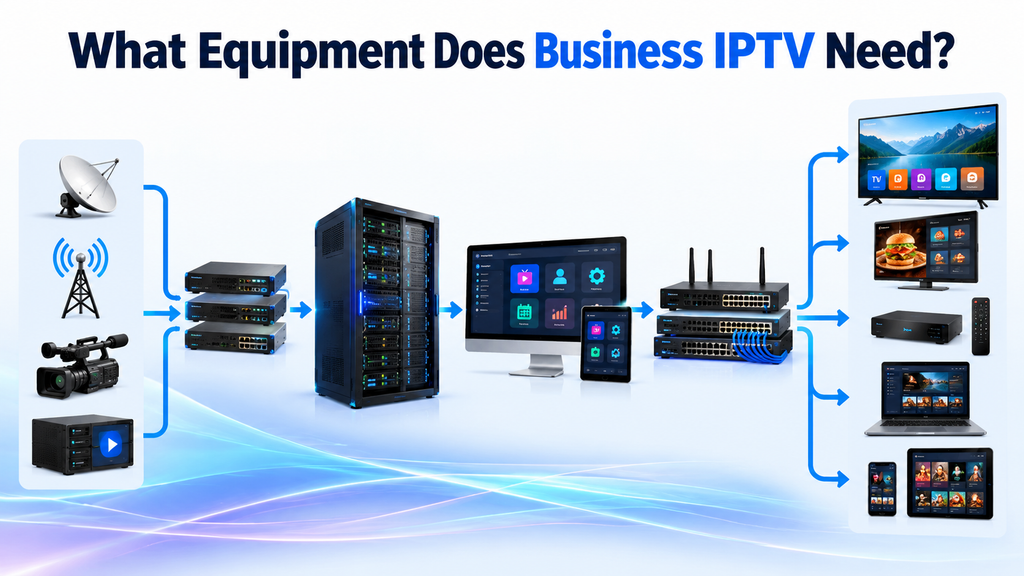
A content management system may also control digital signage, recorded video and schedules.
The network carries the streams to TVs and other endpoints.
Larger installations may use managed switches, VLANs, multicast, Quality of Service and dedicated bandwidth to improve reliability.
The endpoint may be a Smart TV, a commercial display, a set-top box, a computer, or a mobile device.
Not every business needs every component. A small office may have a simple setup, while a large hotel or hospital may need a much more advanced system.
How Much Does IPTV for Business Cost?
Business IPTV typically costs $5 to $25 per screen per month for the platform, plus content licensing, hardware and installation. A 10-screen office starts at around $2,000 upfront and $150 monthly. A 200-room hotel usually runs $30,000 to $100,000 to install.
There is no single price, because cost scales with screen count, locations, content rights, network condition and support level. Here is what makes up the total.
| Cost area | Typical range | When it applies |
| IPTV platform or software | $5 to $25 per screen monthly | Always |
| Content licensing | $10 to $60 per screen monthly | Only if you show third-party channels |
| Set-top boxes or players | $50 to $200 each | Older screens without a built-in player |
| Commercial displays | $400 to $3,000 each | New installs, or replacing consumer TVs |
| Servers and middleware | $2,000 to $20,000 | On-site deployments, not cloud |
| Network upgrades | $500 to $10,000 | Where switching or cabling cannot carry video |
| Installation | $1,000 to $15,000 | Scales with site size |
| Ongoing support | 10% to 20% of install cost yearly | Optional, standard for hotels and healthcare |
Two examples:
A small office with existing WiFi, compatible TVs and internal content only may need little more than the platform license and a few players. Expect roughly $2,000 to start.
A hotel, hospital or campus needs commercial displays, set-top boxes, middleware, servers, network upgrades, monitoring and a support contract. Costs run into tens of thousands.
One thing to watch. Do not compare providers on monthly software price alone. Content rights are often the larger line item, and they are quoted separately. A platform at $8 per screen with $50 of channel licensing costs more than one at $20 with $15 of licensing.
Ask every IPTV provider for a total cost over three years, covering both technology and content rights.
How to Set Up IPTV for a Business
Setting up business IPTV takes seven steps: define what the system is for, count your screens, test your network, sort content licensing, pick a platform and provider, install and configure, then pilot before full rollout. A small office takes two to four weeks. A hotel or hospital takes two to three months.
Step 1 – Define What the System is for
Decide which jobs it must do: live television, staff communication, digital signage, guest entertainment, training, video on demand, or a mix. This decision drives every cost and specification that follows. Write it down before talking to any provider.
Step 2 – Count Screens and Locations
Ten office screens and three hundred hotel rooms are different systems, not different sizes of the same system. List every screen, where it sits, and what it will show.
Step 3 – Test Your Network
Check bandwidth at your busiest hour, not at midday. Confirm your switches support multicast, and check whether existing cabling reaches every planned screen. Allow 5 Mbps per HD stream and 15 to 25 Mbps per 4K stream.
Step 4 – Sort Content Licensing
If any screen faces the public, you need commercial rights. Confirm in writing which content a provider can legally supply in your country. Do this before buying hardware, because licensing has a lead time and can change what you end up buying.
Step 5 – Choose a Platform and Provider
Cloud suits multi-site businesses and keeps setup costs down. On-premises suits single large sites with strict data requirements. Hybrid runs local delivery with cloud management. Ask for a price at your exact screen count, not a headline rate.
Step 6 – Install and Configure
Mount screens, connect players, register devices, set up zones and build your first playlists. Keep video traffic on its own VLAN and enable QoS on your switches.
Step 7 – Pilot Before Full Rollout
Run five to ten screens for two weeks. A pilot surfaces buffering, device compatibility, EPG errors, network bottlenecks and content management problems while they are still cheap to fix.
Then train the people who will change content day to day. Systems fail most often because nobody at the company knows how to use them, not because the technology broke.
Typical timelines: two to four weeks for a small office, four to eight weeks for a retail chain, two to three months for a hotel, hospital or campus.
Legal and Licensing Requirements
Commercial use is one of the most important areas to check before deployment.
A business should not assume that a household TV package can be used in a hotel, restaurant, office or other public environment.
Depending on the country and content, commercial IPTV may involve rights for television channels, movies, sports, music or public performance.
Licensing rules vary by region and use case.
A hotel guest room, restaurant television and internal employee training system may all have different requirements.
Businesses should confirm that their provider is authorized to supply the content and that the agreement covers the intended commercial use.
How to Choose an IPTV Solution for Business
Choose based on your use case first, then scale, then support. Match the system to what your screens actually need to do, confirm it handles your screen count today and in three years, and check the provider holds commercial content rights in writing before comparing features.
| Business Type | Main Priority | What to Look for |
| Hotel | Guest room entertainment and property info | Per-room billing, welcome screen, casting from guest phones |
| Office | Internal communication and training | Live broadcast, searchable VOD library, recording |
| Retail | Digital signage and promotions | Multi-site scheduling, fast content swaps, playback reporting |
| Healthcare | Patient and staff information | Zoning, bedside units, separation of clinical and patient content |
| Bar or gym | Live sport | Commercial sport licence, per screen channel selection |
Check how many screens you need now and how many you may need in the next three years. Compare the cost per screen, since some IPTV platforms offer better pricing as you grow.
Then work through these five checks:
- Device compatibility. Will it run on the screens you already own, or does it need new hardware? Replacing displays can cost more than the platform.
- Network requirements. Does it support multicast? Without it, bandwidth scales with every screen you add.
- Central management. Can one person control every screen across every site from one dashboard? For multi-site businesses, this is the difference between a workable system and a daily chore.
- Commercial content rights. Which content is the provider licensed to supply, and in which countries? Get it in writing.
- Support. What uptime is guaranteed, what are the response times, and is there a named contact?
For larger IPTV setups, reliable support matters more than extra features. Check the provider’s uptime commitment, response times, and support terms before signing.
Ask for a short trial on a few screens first. Real use will quickly show whether the system is stable and easy to manage.
7 Common Problems for Business IPTV and How to Fix Them
Most business IPTV faults come from the local network rather than the provider. Check bandwidth, QoS settings and multicast support before escalating. Problems affecting one screen are almost always local hardware.
| Problem | Likely Cause | Fix |
| Buffering at busy times | Network saturated, or unicast where multicast would work | Enable QoS, confirm multicast support with your provider |
| One screen fails, others fine | Local hardware | Replace the cable, then the player |
| Content does not update | Lost server connection or cached playlist | Restart the endpoint and force a sync |
| Audio out of sync | Decoder setting | Switch the player from software to hardware decoding |
| A channel disappears | Provider license lapsed | Contact the provider rather than troubleshooting your own setup |
| Screens dark after a reboot | No autostart configured | Set the player to launch on power-up |
| Whole system down | Internet line or server | Check which, then fail over to cached content |
The Future of Business IPTV Solutions
Business IPTV is becoming increasingly connected to digital signage, cloud platforms, and enterprise communication systems.
Cloud-based management can make it easier to control screens across different locations.
AI may also play a role in content recommendations, scheduling, analytics and personalization.
Hotels and retail businesses may use more personalized screen content based on location or audience.
Interactive video may also become more common in training, events and customer experiences.
The competitor article follows a similar direction, focusing on integration, interactivity, accessibility, and greater scalability as future IPTV trends.
Is IPTV Worth It for a Business?
For most organizations running video on more than a few screens, yes. IPTV earns its cost when a business needs central management, multiple locations, custom content or a combination of TV, training and signage. It is harder to justify for one or two televisions.
It is worth it when:
- You run screens across more than one location
- You need different content on different screens
- You want TV, signage and internal video in one system
- Someone currently updates screens manually
- You need viewing data to justify the spend
It is probably not worth it when:
- You have one or two televisions in a single room
- You only need live channels and nothing else
- Nobody will own the system day to day
A small business with two TVs in a waiting area will find a standard commercial TV service simpler to manage. The value of IPTV increases with the number of screens, the number of sites, and the frequency of content changes.
Conclusion — IPTV Solutions for Business
IPTV for business is not simply a replacement for cable TV. It is a video distribution system that can support communication, training, entertainment and digital signage across an organization.
Hotels can use it for guest entertainment. Offices can use it for company broadcasts. Retail stores can use it for promotions. Hospitals and universities can use it for information and training.
The main benefits are centralized management, flexible content and easier expansion across many screens or locations.
Before choosing a system, define what the business actually needs, check the network, confirm commercial content rights and make sure the platform can scale with future demand.
For organizations that need to manage video across more than a few screens, a well-planned business IPTV solution can be more useful than a simple television service.
FAQs on IPTV System for Business
What is IPTV for business?
A TV and video system that runs over your company network. It delivers live channels, recorded video and digital signage to screens across one or many sites, managed from one dashboard.
Is IPTV legal for business use?
Yes, if your provider holds commercial distribution rights for the content. A residential subscription does not cover public viewing in a venue. Confirm commercial rights in writing before signing.
How much does business IPTV cost?
Software typically runs $5 to $25 per screen monthly, plus content and hardware. A 10-screen office starts around $2,000 up front and $150 a month. Hotels and hospitals cost considerably more.
What is the difference between IPTV and OTT for business?
IPTV runs over a network you control, which gives steadier quality. OTT runs over the open internet. Many business systems now use both.
How can I start my own IPTV business?
You can start an IPTV business by choosing a target market, securing legal content rights, selecting an IPTV platform, setting up billing and support, and launching with a clear pricing and marketing plan.
Do I need a TV license for IPTV?
It depends on your country and how you use IPTV. For commercial use, you may need content distribution rights, broadcasting permissions, or public performance licenses. A residential TV license alone may not cover business use.
How to get an IPTV dealership?
To get an IPTV dealership, find a legitimate IPTV provider with an authorized reseller program, verify its content licensing, compare wholesale pricing and support, then sign a reseller agreement before selling the service.
Is reselling IPTV legal?
Yes, reselling IPTV can be legal if the provider has the required content rights and gives you permission to resell the service. Reselling unauthorized or pirated streams is illegal in many countries.
How to get into the IPTV business?
To enter the IPTV business, choose a legal business model, define your target audience, secure content rights, select an IPTV platform, set pricing, and develop a customer support and marketing plan.
What is the best IPTV supplier?
The best IPTV supplier is a licensed provider that offers reliable streams, clear reseller terms, strong uptime, EPG support, device compatibility, and responsive technical support. Always verify its content rights before partnering or reselling.
Where can I find wholesale IPTV products?
You can find wholesale IPTV products through licensed IPTV distributors, authorized resellers, white label IPTV platforms, and commercial content aggregators. Before buying, verify content rights, reseller terms, pricing, support, and whether the supplier allows legal redistribution.
How do I get an IPTV provider?
To get an IPTV provider, compare licensed providers that offer the channels, device support, pricing, EPG, uptime, and support you need. Verify the provider’s content rights and terms before subscribing or reselling.
How do people sell IPTV?
People sell IPTV by operating a licensed service or joining an authorized reseller program. They typically buy access at wholesale rates, create customer plans, handle billing and support, and resell the service under agreed terms.
How to find an IPTV provider?
To find an IPTV provider, compare licensed providers and authorized distributors based on channel availability, stream quality, device support, EPG, pricing, uptime, and customer support. Always verify content rights and reseller terms before signing up.
How much internet speed does business IPTV need?
Business IPTV requires at least 25mbps for high-end resolutions. At 15 Mbps, you can enjoy HD videos, but 25-30 Mbps is ideal for FHD and 4K streaming.